
'%3e%3cg%3e%3cpath%20d='M12.04834,6.05824C12.09325,4.8457799999999995,12.43703,3.78081,13.0715,2.89055C13.7092,1.995784,14.7633,1.3601670000000001,16.2063,1C16.215899999999998,1.0440338,16.2259,1.088092,16.2363,1.131979L16.2363,1.3623509999999999C16.2363,1.884725,16.1084,2.48372,15.856,3.14258C15.5915,3.78052,15.1781,4.38093,14.6291,4.92281C14.1157,5.40028,13.6406,5.71638,13.2207,5.85928C13.0822,5.9003,12.89209,5.94066,12.66255,5.97701C12.45842,6.00853,12.25362,6.03563,12.04834,6.05824ZM12.28933,7.85741C10.6594,7.85741,9.52778,6.42896,7.91997,6.42896C6.31224,6.42896,3,7.89332,3,12.9488C3,18.0043,5.94131,21.2617,6.27029,21.642C6.599209999999999,22.0224,7.36005,23,8.5387,23C9.71744,23,11.00787,22.0715,12.28933,22.0715C13.5707,22.0715,15.1836,23,16.2365,23C17.2895,23,17.7226,22.5747,18.4392,21.8411C19.1558,21.1074,20.5227,18.8686,21,17.5248C20.2137,17.061,18.1298,15.8019,18.1298,12.9488C18.1298,11.0468,18.831200000000003,9.4667,20.2341,8.20853C19.3138,7.02216,18.2464,6.42896,17.0318,6.42896C15.2099,6.42896,13.9193,7.85741,12.28933,7.85741Z'%20fill='%23000000'%20fill-opacity='1'/%3e%3c/g%3e%3c/g%3e%3c/svg%3e)
'%3e%3cg%3e%3cpath%20d='M6.2985500000000005,2L14.60082,10.81153L16.7432,8.537289999999999C13.81573,6.65184,9.89484,4.122529999999999,8.13152,2.985321L6.95017,2.225593C6.74135,2.090554,6.5177700000000005,2.0178354,6.2985500000000005,2ZM5.0312551,3.05499C5.0144537,3.1518100000000002,5,3.24911,5,3.35357L5,20.7675C5,20.8406,5.0138389,20.9085,5.0234395,20.9782L13.4695,12.0125L5.0312551,3.05499ZM18.1511,9.444659999999999L15.7321,12.0125L18.1089,14.5354C19.3682,13.7252,20.2405,13.1626,20.3372,13.1007C20.7653,12.8229,21.007,12.4039,20.9998,11.94614C20.9934,11.49683,20.7516,11.09514,20.340400000000002,10.84799C20.2484,10.79194,19.387999999999998,10.24048,18.1511,9.444659999999999ZM14.60082,13.2134L6.3235600000000005,22C6.48437,21.9703,6.64498,21.9194,6.79859,21.8209C7.01141,21.6833,12.76069,17.9805,16.701,15.4428L14.60082,13.2134Z'%20fill='%23000000'%20fill-opacity='1'/%3e%3c/g%3e%3c/g%3e%3c/svg%3e)


4.9
'%3e%3cg%3e%3cpath%20d='M11.1034615625,1.816990478790283C11.4702615625,1.0737404787902831,12.5300515625,1.0737404787902831,12.8968515625,1.816990478790283L15.2941515625,6.674462478790283C15.4398515625,6.969602478790283,15.7214515625,7.174172478790283,16.047151562499998,7.221502478790283L21.4076515625,8.000432478790284C22.2278515625,8.119612478790284,22.5553515625,9.127592478790284,21.9618515625,9.706122478790283L18.0829515625,13.487052478790282C17.8472515625,13.716852478790283,17.7397515625,14.047852478790283,17.7953515625,14.372252478790283L18.7110515625,19.711052478790283C18.8511515625,20.527952478790283,17.9937515625,21.150952478790284,17.2601515625,20.765252478790284L12.4654515625,18.244552478790283C12.1741515625,18.091452478790284,11.8261515625,18.091452478790284,11.5348615625,18.244552478790283L6.7402115625,20.765252478790284C6.0065815625,21.150952478790284,5.1491515625,20.527952478790283,5.2892615625,19.711052478790283L6.2049515625,14.372252478790283C6.2605915625,14.047852478790283,6.1530415625,13.716852478790283,5.9173515625,13.487052478790282L2.0384295625,9.706122478790283C1.4449195625,9.127592478790284,1.7724199625,8.119612478790284,2.5926495625,8.000432478790284L7.9531815625,7.221502478790283C8.2788915625,7.174172478790283,8.560461562499999,6.969602478790283,8.7061215625,6.674462478790283L11.1034615625,1.816990478790283Z'%20fill='%23F0A000'%20fill-opacity='1'%20style='mix-blend-mode:passthrough'/%3e%3c/g%3e%3cg%20mask='url(%23master_svg1_5_13539)'%3e%3c/g%3e%3c/g%3e%3c/svg%3e)
Chrome Store
Download the DreamFace App to Create Anywhere
Language
EnglishKling 3.0 is an AI video generator for text-to-video and image-to-video creation. Kling 3.0 stands out for native audio, multi-shot storytelling, shot control, stronger prompt adherence, and reference-based video generation.
Upload JPG/PNG/WEBP images up to 10MB, with a minimum width/height of 300px.



Chrome Store
Global Users

Apple Store
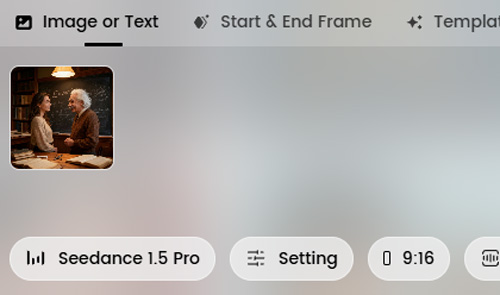
Begin with a text prompt, upload an image, or add reference material to guide the result. Kling 3.0 supports text-to-video, image-to-video, and reference-based video generation, so Kling 3.0 works from a fresh idea, a product shot, or an existing visual direction.
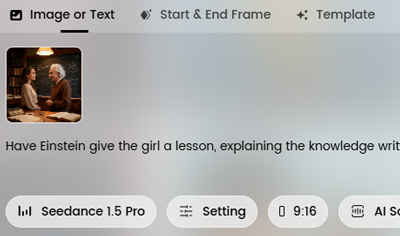
Describe camera angles, scene flow, dialogue, pacing, and movement in clear language. Strong prompting helps Kling 3.0 deliver better shot control, stronger prompt adherence, and more cinematic multi-shot storytelling.
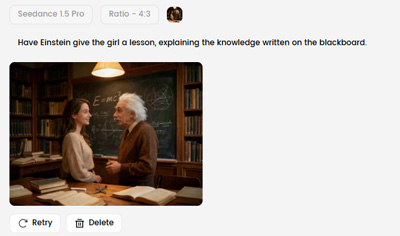
Create your clip, review the output, then refine the prompt or references to improve timing, continuity, or scene details. This online Kling 3.0 workflow supports faster iteration and a smoother path from concept to usable video.
















What Users Are Saying
Kling 3.0 is easier to guide than most video models
What stood out to me was how much more controllable Kling 3.0 felt. When I changed camera direction, pacing, or shot flow in the prompt, Kling 3.0 was more likely to follow the instruction instead of drifting into a generic AI video result.Kling 3.0 native audio makes rough cuts more usable
A lot of AI video tools leave the first draft feeling unfinished. With Kling 3.0 native audio in the same workflow, I can judge the scene, the dialogue, and the timing much earlier in the Kling 3.0 review process.Kling 3.0 works well for ad concepts and product clips
For short promo videos, Kling 3.0 is one of the more practical AI video generator options I have used. Kling 3.0 makes it easier to test different hooks, scene orders, and product-video directions without rebuilding the whole sequence.Kling 3.0 consistency holds up across multiple shots
The Kling 3.0 consistency is noticeably better when you are trying to keep the same subject across multiple shots. That matters for branded content, recurring characters, product storytelling, and any short sequence that needs connected scenes.Kling 3.0 is strong for storyboard-style iteration
I would not pick Kling 3.0 just for random one-off visuals. Kling 3.0 starts to feel valuable when you want to test a multi-shot sequence, compare versions, and tighten the flow of a short story, ad concept, or campaign idea.Using Kling 3.0 online makes the workflow lighter
The model itself is the draw, but the practical win is being able to use Kling 3.0 in a simpler online workflow. That makes Kling 3.0 easier for prompt review, revision, and fast iteration without turning the process into a full production setup.Kling 3.0 is easier to guide than most video models
What stood out to me was how much more controllable Kling 3.0 felt. When I changed camera direction, pacing, or shot flow in the prompt, Kling 3.0 was more likely to follow the instruction instead of drifting into a generic AI video result.Kling 3.0 native audio makes rough cuts more usable
A lot of AI video tools leave the first draft feeling unfinished. With Kling 3.0 native audio in the same workflow, I can judge the scene, the dialogue, and the timing much earlier in the Kling 3.0 review process.Kling 3.0 works well for ad concepts and product clips
For short promo videos, Kling 3.0 is one of the more practical AI video generator options I have used. Kling 3.0 makes it easier to test different hooks, scene orders, and product-video directions without rebuilding the whole sequence.Kling 3.0 consistency holds up across multiple shots
The Kling 3.0 consistency is noticeably better when you are trying to keep the same subject across multiple shots. That matters for branded content, recurring characters, product storytelling, and any short sequence that needs connected scenes.Kling 3.0 is strong for storyboard-style iteration
I would not pick Kling 3.0 just for random one-off visuals. Kling 3.0 starts to feel valuable when you want to test a multi-shot sequence, compare versions, and tighten the flow of a short story, ad concept, or campaign idea.Using Kling 3.0 online makes the workflow lighter
The model itself is the draw, but the practical win is being able to use Kling 3.0 in a simpler online workflow. That makes Kling 3.0 easier for prompt review, revision, and fast iteration without turning the process into a full production setup.