


4.9
'%3e%3cg%3e%3cpath%20d='M11.1034615625,1.816990478790283C11.4702615625,1.0737404787902831,12.5300515625,1.0737404787902831,12.8968515625,1.816990478790283L15.2941515625,6.674462478790283C15.4398515625,6.969602478790283,15.7214515625,7.174172478790283,16.047151562499998,7.221502478790283L21.4076515625,8.000432478790284C22.2278515625,8.119612478790284,22.5553515625,9.127592478790284,21.9618515625,9.706122478790283L18.0829515625,13.487052478790282C17.8472515625,13.716852478790283,17.7397515625,14.047852478790283,17.7953515625,14.372252478790283L18.7110515625,19.711052478790283C18.8511515625,20.527952478790283,17.9937515625,21.150952478790284,17.2601515625,20.765252478790284L12.4654515625,18.244552478790283C12.1741515625,18.091452478790284,11.8261515625,18.091452478790284,11.5348615625,18.244552478790283L6.7402115625,20.765252478790284C6.0065815625,21.150952478790284,5.1491515625,20.527952478790283,5.2892615625,19.711052478790283L6.2049515625,14.372252478790283C6.2605915625,14.047852478790283,6.1530415625,13.716852478790283,5.9173515625,13.487052478790282L2.0384295625,9.706122478790283C1.4449195625,9.127592478790284,1.7724199625,8.119612478790284,2.5926495625,8.000432478790284L7.9531815625,7.221502478790283C8.2788915625,7.174172478790283,8.560461562499999,6.969602478790283,8.7061215625,6.674462478790283L11.1034615625,1.816990478790283Z'%20fill='%23F0A000'%20fill-opacity='1'%20style='mix-blend-mode:passthrough'/%3e%3c/g%3e%3cg%20mask='url(%23master_svg1_5_13539)'%3e%3c/g%3e%3c/g%3e%3c/svg%3e)
Chrome Store
DreamFace
Language
EnGenerate and edit images online with Seedream 4.0. DreamFace Seedream AI Image Generator turns text prompts, photos, and reference images into AI art, realistic visuals, product concepts, social posts, and polished creative assets.
Upload JPG/PNG/WEBP images up to 10MB, with a minimum width/height of 300px.


Chrome Store
Global Users

Apple Store
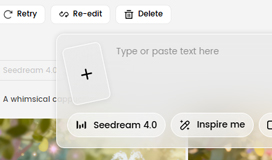
Start with an image when you want Seedream 4.0 to follow a face, product, pose, style, layout, or visual direction. A clear reference helps the AI keep the result closer to your intent.
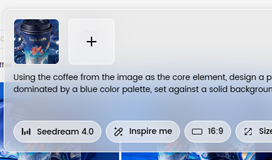
Describe what you want to create or change. Add the subject, style, background, lighting, camera angle, mood, colors, and any details you want the Seedream AI Image Generator to follow.
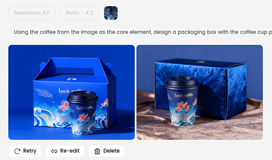
Create your AI image, compare the output, then refine it with follow-up prompts. Adjust details, replace elements, change the scene, or improve the style until the final image feels right.
















What Creators Say About Seedream AI Image Generator
Great for Testing Visual Ideas Fast
I use Seedream when I need several image directions before choosing one. A single prompt gives me enough options to test a campaign concept, then I refine the best version with more specific edits.Helpful for Character and Scene Concepts
Seedream AI Image Generator is useful for early creative work. I can describe a character, add a reference image, and quickly explore different outfits, backgrounds, and moods before building the final design.Reference Images Make Results Easier to Control
Uploading a reference photo makes a big difference. The output keeps the direction I want, but I can still change the style, lighting, and background with prompts instead of editing everything manually.Photo Editing Feels Much Faster
I used Seedream to clean up a product image, change the background, and adjust the lighting for a social post. It saved me from opening multiple editing tools just to make one image usable.Easy Enough for Non-Designers
I do not have advanced design skills, but Seedream makes image creation feel simple. I write what I want, check the result, and improve it with another prompt until it looks ready to share.Useful for Social Content Production
Seedream helps me create fresh visuals for posts, thumbnails, and ad tests. It is especially useful when I need a specific mood or style but do not want to spend hours searching for stock images.Great for Testing Visual Ideas Fast
I use Seedream when I need several image directions before choosing one. A single prompt gives me enough options to test a campaign concept, then I refine the best version with more specific edits.Helpful for Character and Scene Concepts
Seedream AI Image Generator is useful for early creative work. I can describe a character, add a reference image, and quickly explore different outfits, backgrounds, and moods before building the final design.Reference Images Make Results Easier to Control
Uploading a reference photo makes a big difference. The output keeps the direction I want, but I can still change the style, lighting, and background with prompts instead of editing everything manually.Photo Editing Feels Much Faster
I used Seedream to clean up a product image, change the background, and adjust the lighting for a social post. It saved me from opening multiple editing tools just to make one image usable.Easy Enough for Non-Designers
I do not have advanced design skills, but Seedream makes image creation feel simple. I write what I want, check the result, and improve it with another prompt until it looks ready to share.Useful for Social Content Production
Seedream helps me create fresh visuals for posts, thumbnails, and ad tests. It is especially useful when I need a specific mood or style but do not want to spend hours searching for stock images.