
'%3e%3cg%3e%3cpath%20d='M12.04834,6.05824C12.09325,4.8457799999999995,12.43703,3.78081,13.0715,2.89055C13.7092,1.995784,14.7633,1.3601670000000001,16.2063,1C16.215899999999998,1.0440338,16.2259,1.088092,16.2363,1.131979L16.2363,1.3623509999999999C16.2363,1.884725,16.1084,2.48372,15.856,3.14258C15.5915,3.78052,15.1781,4.38093,14.6291,4.92281C14.1157,5.40028,13.6406,5.71638,13.2207,5.85928C13.0822,5.9003,12.89209,5.94066,12.66255,5.97701C12.45842,6.00853,12.25362,6.03563,12.04834,6.05824ZM12.28933,7.85741C10.6594,7.85741,9.52778,6.42896,7.91997,6.42896C6.31224,6.42896,3,7.89332,3,12.9488C3,18.0043,5.94131,21.2617,6.27029,21.642C6.599209999999999,22.0224,7.36005,23,8.5387,23C9.71744,23,11.00787,22.0715,12.28933,22.0715C13.5707,22.0715,15.1836,23,16.2365,23C17.2895,23,17.7226,22.5747,18.4392,21.8411C19.1558,21.1074,20.5227,18.8686,21,17.5248C20.2137,17.061,18.1298,15.8019,18.1298,12.9488C18.1298,11.0468,18.831200000000003,9.4667,20.2341,8.20853C19.3138,7.02216,18.2464,6.42896,17.0318,6.42896C15.2099,6.42896,13.9193,7.85741,12.28933,7.85741Z'%20fill='%23000000'%20fill-opacity='1'/%3e%3c/g%3e%3c/g%3e%3c/svg%3e)
'%3e%3cg%3e%3cpath%20d='M6.2985500000000005,2L14.60082,10.81153L16.7432,8.537289999999999C13.81573,6.65184,9.89484,4.122529999999999,8.13152,2.985321L6.95017,2.225593C6.74135,2.090554,6.5177700000000005,2.0178354,6.2985500000000005,2ZM5.0312551,3.05499C5.0144537,3.1518100000000002,5,3.24911,5,3.35357L5,20.7675C5,20.8406,5.0138389,20.9085,5.0234395,20.9782L13.4695,12.0125L5.0312551,3.05499ZM18.1511,9.444659999999999L15.7321,12.0125L18.1089,14.5354C19.3682,13.7252,20.2405,13.1626,20.3372,13.1007C20.7653,12.8229,21.007,12.4039,20.9998,11.94614C20.9934,11.49683,20.7516,11.09514,20.340400000000002,10.84799C20.2484,10.79194,19.387999999999998,10.24048,18.1511,9.444659999999999ZM14.60082,13.2134L6.3235600000000005,22C6.48437,21.9703,6.64498,21.9194,6.79859,21.8209C7.01141,21.6833,12.76069,17.9805,16.701,15.4428L14.60082,13.2134Z'%20fill='%23000000'%20fill-opacity='1'/%3e%3c/g%3e%3c/g%3e%3c/svg%3e)

Seedream 4.5: How I Optimize Social Posts with AI for Personal Image Building
I’ve tried several AI photo generators over time, mostly for casual edits and personal use, not for any professional or commercial account. Seedream 4.5 stood out to me not because it felt more advanced, but because it responded better to what I was actually trying to do.
- AI Image Generator
- Image to Image
- Text-to-Image
- AI Photo

To begin with, I've tried several AI photo generators over time, mostly for casual edits and personal use, not for any professional or commercial account. Seedream 4.5 stood out to me not because it felt more advanced, but because it responded better to what I was actually trying to do.
Why I Choose Seedream 4.5
What is Seedream 4.5
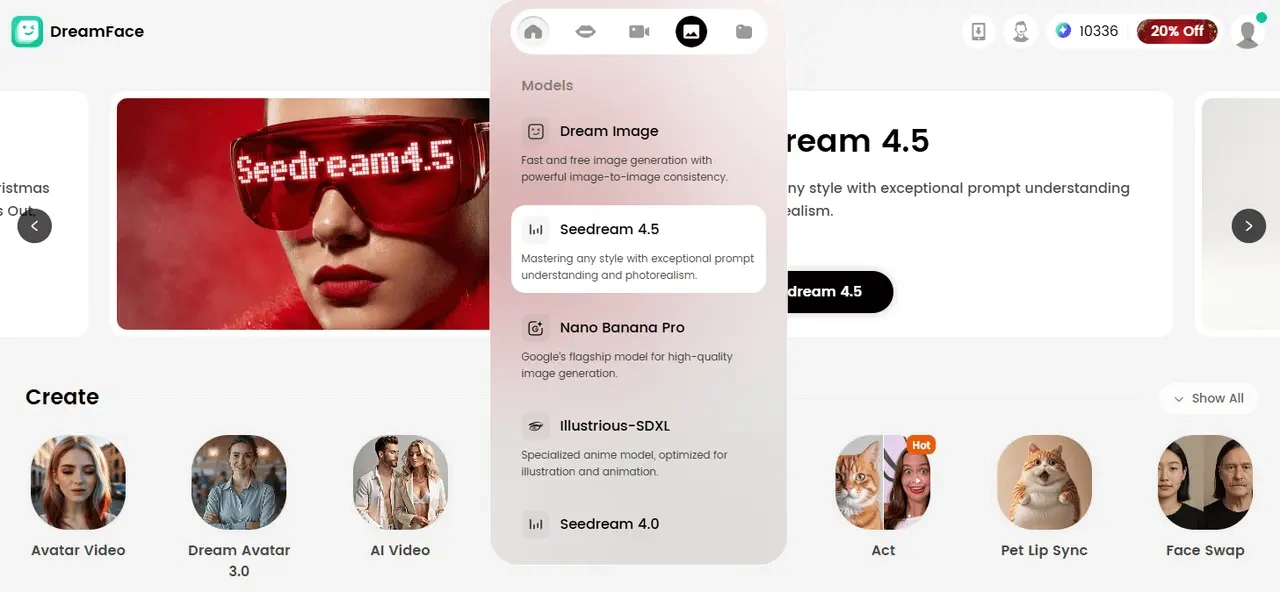
“Seedream 4.5 is ByteDance's latest and most advanced AI image generation model. With significant improvements in performance, it stands out in the field of artificial intelligence-based image editing.”
Advantages of Seedream 4.5
I was curious to see how Seedream 4.5 would handle my casual social posts compared with other AI photo generators I'd tried. In my experience, it performs better in scenarios like maintaining facial details, creating realistic backgrounds, or adapting to seasonal trends—things some previous tools struggled with.
According to the official tool introduction, Seedream 4.5 is ByteDance's latest AI image generation model. It emphasizes face and background preservation, making it a more reliable choice than
Seedream 4.0
, and competitors like
Nano Banana Pro
.
From my own use:
- Edits stay consistent even when I make multiple adjustments.
- Combining multiple images feels smoother and less error-prone.
- The results usually match what I imagined, thanks to ongoing AI reasoning improvements.
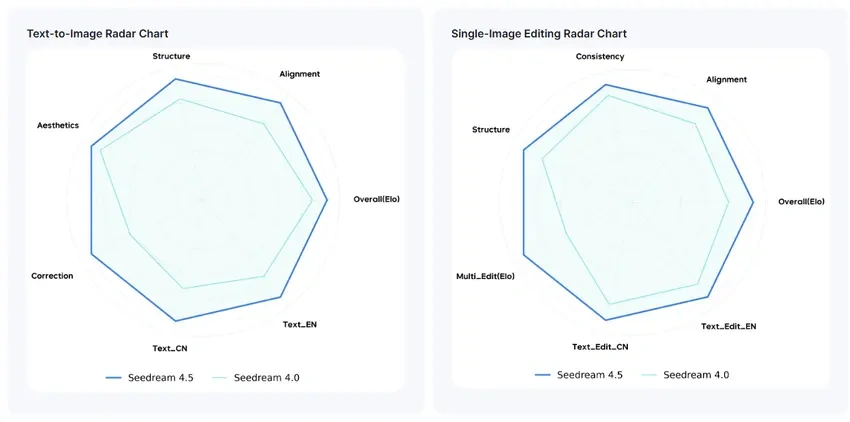
Seedream 4.5 vs 4.0: A Detailed Comparison of Image Generation Features.
Stylish Detail Presentation with Seedream 4.5
I pay attention to small details in the accessories I include in my social posts. I often get frustrated when photos I like contain outdated or inconsistent elements. I've tried several AI tools to adjust outfits and accessories, but Seedream 4.5 stands out with its enhanced accuracy in maintaining consistency.
It lets me seamlessly integrate desired elements into my images while keeping the overall look natural.
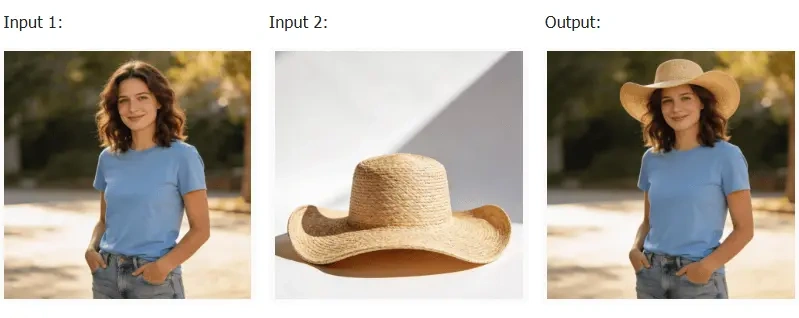
Example of Combination:
(Prompt: Put this hat on me) — Seedream 4.5 easily blends the hat with my image, keeping proportions and lighting realistic.
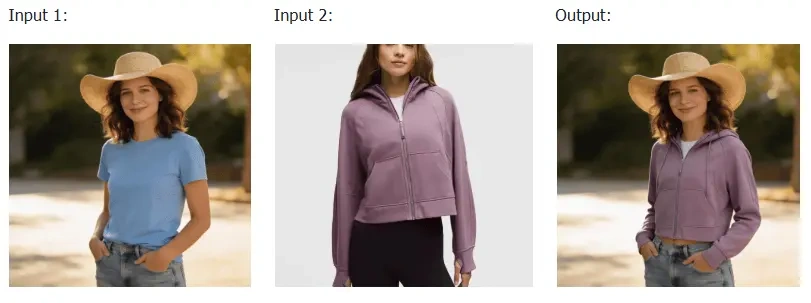
Example of Change:
(Prompt: Change my top to the latest Lululemon Scuba hoodie) — Seedream 4.5 updates the outfit while keeping the original pose and body proportions intact, making the change feel natural rather than over-edited.
Key Applications:
- Add Graphical Elements to Your Clothes: I can enhance my wardrobe in photos by adding custom graphics or patterns, creating unique and personalized outfits.
- Incorporate Accessories: Hats, glasses, jewelry, and other accessories can be added seamlessly to complement my style.
- Modify Your Gesture: I can adjust posture or gestures to match the aesthetic I want in each image.
Seamless Transition Between Realistic Backgrounds
With Seedream 4.5, creating realistic background transitions feels more natural and less over-processed, especially for social posts.、
- Enhanced Texture Detail: Seedream 4.5 handles lighting, shadows, and textures more smoothly, which helps the background blend better with the subject instead of looking artificial.
- Advanced Text-to-Image Function: By uploading a photo and describing the background you want, the model generates a result that aligns well with the original image in terms of tone and atmosphere.
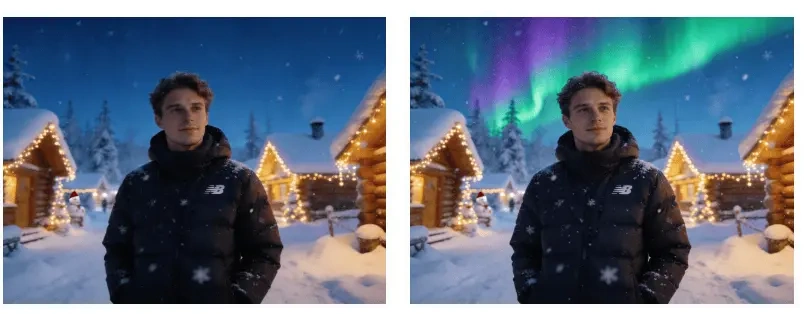
Example of Transition:
(Prompt: Add aurora to the original image.)
I once tried to add an aurora effect to my travel photos after a failed aurora chase. Without the colorful light, the original image looked flat, and my face appeared slightly underlit. Seedream 4.5 not only added the aurora naturally to the background but also adjusted the facial lighting, making the overall image feel more balanced and realistic.
Better Aesthetics and Authenticity for Trend-Driven Posts
In my experience, aesthetic quality is a key factor in how I judge the effectiveness of AI-generated photos. That's why Seedream 4.5 feels like a more reliable helper to me. For social posts, aesthetics and authenticity work together as essential indicators of overall image quality.
As winter approaches, snow-themed photos are becoming increasingly common on social media. Here's an example prompt I used: “Realistic Nordic snow scene in an Instagram-style, wearing fluffy earmuffs and a black Fair Isle sweater.” Below is a comparison between the outputs generated by Seedream 4.5 and Seedream 4.0.
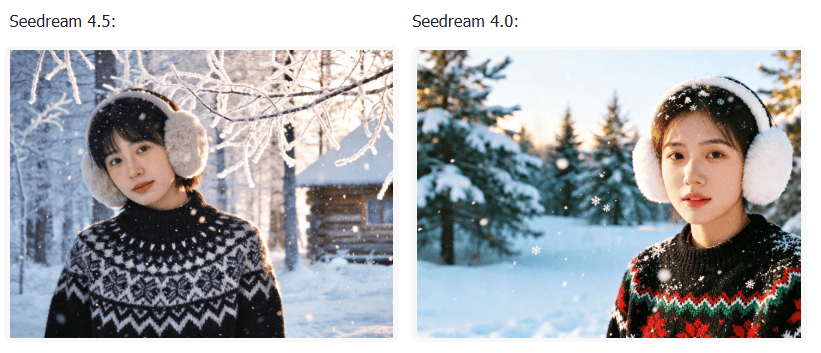
Create Trendy Snow Photos by Inputting Text with Seedream 4.5. (Input: Realistic Nordic snow scene in an Instagram-style, wearing fluffy earmuffs and a black Fair Isle sweater.)
- Aesthetics: Before trying Seedream 4.5, I was already satisfied with the results generated by Seedream 4.0. However, the output from Seedream 4.5 stands out in how well it adapts to current visual trends. I find its framing, composition, and lighting more appealing, which makes the image feel more suitable for sharing on social media.
- Authenticity: Although Seedream 4.0 can also generate faces that look realistic, Seedream 4.5 achieves a better balance between facial details and lighting. In comparison, the stronger lighting in Seedream 4.0 makes the image feel slightly dated. I also find facial expressions generated by Seedream 4.5 more natural and convincing overall.
Final Thoughts
After using Seedream 4.5 across different scenarios, I find it easier to adapt my social posts to current visual trends without overcomplicating the editing process. The improvements in detail and aesthetics feel practical rather than overwhelming, and they don't noticeably slow down the workflow.
Overall, Seedream 4.5 streamlines image editing for personal use, making it possible to create visually consistent and trend-aware content in a relatively short amount of time.
Uncensored AI Image Generator: Which Models Offer More Freedom?
Searching for an uncensored AI image generator can mean several things. You might want more room for dark fantasy, unconventional fashion, or challenging editorial concepts.
By Tina一Sep 19, 2026- AI Image Generator
- GPT Image 2.5
GPT Image 2.5 Prompting Guide: 4 Real Examples for Creators
A campaign image can look beautiful and still miss the brief. The headline might compete with a face, a product diagram might become unreadable on mobile, or an outfit edit might change more than the clothes.
By Skylar一Sep 18, 2026- Text-to-Image
- AI Image Generator
- GPT Image 2.5
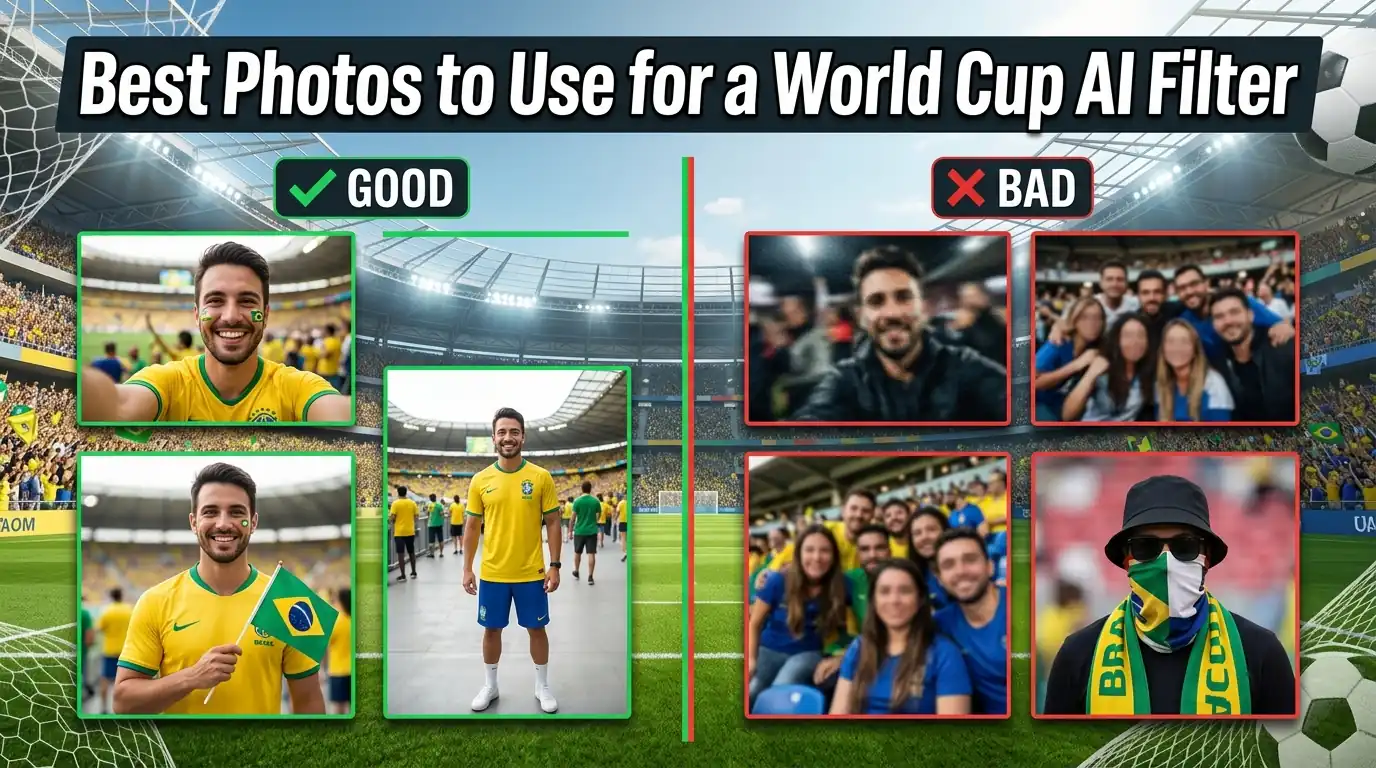
Best Photos to Use for a World Cup AI Filter
Learn what kind of photo works best for Dreamface World Cup AI filters, from fan portraits to football action-style pictures.
By Joanna一May 15, 2026- AI Photo