


How to Make a Split-Screen OST Video with DreamFace Avatar 3.0
Learn how to create viral split-screen videos featuring characters singing original soundtracks using DreamFace Avatar 3.0. Step-by-step tutorial for recreating cinematic OST moments with AI.
- Avatar Video
- Photo To Video
- AI Video
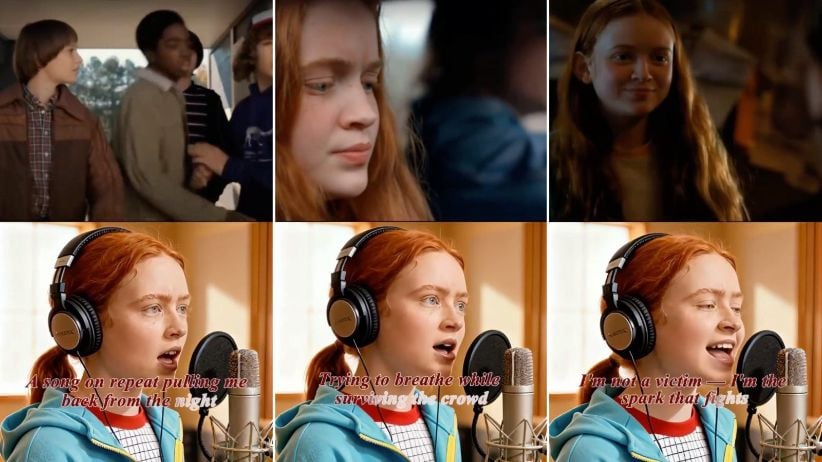
In the age of AI-generated content, creators are finding new and engaging ways to bring beloved movie moments to life. One trending format on platforms like TikTok and Instagram Reels? A split-screen video where the top half plays a cinematic montage, and the bottom shows the film’s protagonist performing the original soundtrack — as if they recorded it live in a studio.
In this tutorial, we’ll walk you through how to create this effect using DreamFace’s Avatar 3.0 tool — from generating the singing avatar to editing the final split-screen cut.
What You’ll Need
Before we dive into the steps, here’s what you’ll need:
- Clips from the original film (for the top half)
- A high-quality image of the character (preferably front-facing)
- The OST audio file you want the character to sing
- Any basic video editing software (CapCut, Premiere, etc.)
Step-by-Step: Create the Singing Avatar
1. Prepare Your Image
Choose a clear image of the character you'd like to animate — ideally a close-up shot with good lighting. You can take a still from the movie itself.
Tip: For best results, use a frame where the character is looking forward and has a neutral or expressive face.
2. Use DreamFace’s Avatar 3.0 Tool
Head to the Dream Avatar tool . Upload your character image, then add the OST audio file (MP3 or WAV). DreamFace will automatically sync the audio to generate a realistic singing animation.
What Avatar 3.0 brings:
- Accurate lip-sync with musical timing
- Expressive facial movements, especially during emotional parts of the song
- Cinematic quality rendering with natural performance dynamics
Want extra realism? Use subtle expressions in the image or request slight head movement using the advanced settings.
Step 3: Assemble the Split-Screen Video
Now that you have both the singing clip and the original film footage:
- Open your video editor
- Place the original movie montage on the top half of the screen
- Add the AI-generated singing avatar video to the bottom half
- Sync the visuals with the OST audio for perfect timing
- Export and share!
You now have a seamless, emotionally engaging split-screen performance — the character feels like they’re truly singing their own soundtrack.
Why This Format Works
This split-screen concept works well because it blends nostalgia with novelty. Viewers get to re-experience iconic scenes while seeing the character come to life in a new way. It’s perfect for:
- Movie fan pages
- OST lovers
- Short-form video creators looking for viral formats
Try It Now
Whether you're recreating your favorite film moment or giving a character their own concert, DreamFace's Avatar 3.0 makes it simple.
.webp)
DreamFace AI Live Avatar: Always-On AI Character Livestreaming
Turn any character into an always-on live streaming host — from talk shows and quizzes to memorial tributes and late-night companionship — with no one required behind the camera.
By Daniel一Aug 18, 2026- AI Video
- AI Live Avatar

Best AI Video Generator 2026: Why Multi-Model AI Platforms Are Winning
AI video generation has entered a completely new era in 2026. What started as short experimental clips has rapidly evolved into cinematic storytelling, AI anime production, virtual influencers, talking avatars, and fully AI-generated social media content.
By Bentley一May 26, 2026- AI Video Generator
- AI Video
Seedance 2.1 Is Coming: Better Quality, Lower Costs, and a Big Boost for AI Storytelling
The AI video generation race has slowed down a bit recently. Earlier this year, new models were launching almost every week, pushing image and video generation forward at an incredible pace. After the buzz around GPT Image models, the industry has been waiting for the next major leap in AI video.
By stxph一May 23, 2026- AI Video
- Seedance 2.1
- Seedance 2.0