
'%3e%3cg%3e%3cpath%20d='M12.04834,6.05824C12.09325,4.8457799999999995,12.43703,3.78081,13.0715,2.89055C13.7092,1.995784,14.7633,1.3601670000000001,16.2063,1C16.215899999999998,1.0440338,16.2259,1.088092,16.2363,1.131979L16.2363,1.3623509999999999C16.2363,1.884725,16.1084,2.48372,15.856,3.14258C15.5915,3.78052,15.1781,4.38093,14.6291,4.92281C14.1157,5.40028,13.6406,5.71638,13.2207,5.85928C13.0822,5.9003,12.89209,5.94066,12.66255,5.97701C12.45842,6.00853,12.25362,6.03563,12.04834,6.05824ZM12.28933,7.85741C10.6594,7.85741,9.52778,6.42896,7.91997,6.42896C6.31224,6.42896,3,7.89332,3,12.9488C3,18.0043,5.94131,21.2617,6.27029,21.642C6.599209999999999,22.0224,7.36005,23,8.5387,23C9.71744,23,11.00787,22.0715,12.28933,22.0715C13.5707,22.0715,15.1836,23,16.2365,23C17.2895,23,17.7226,22.5747,18.4392,21.8411C19.1558,21.1074,20.5227,18.8686,21,17.5248C20.2137,17.061,18.1298,15.8019,18.1298,12.9488C18.1298,11.0468,18.831200000000003,9.4667,20.2341,8.20853C19.3138,7.02216,18.2464,6.42896,17.0318,6.42896C15.2099,6.42896,13.9193,7.85741,12.28933,7.85741Z'%20fill='%23000000'%20fill-opacity='1'/%3e%3c/g%3e%3c/g%3e%3c/svg%3e)
'%3e%3cg%3e%3cpath%20d='M6.2985500000000005,2L14.60082,10.81153L16.7432,8.537289999999999C13.81573,6.65184,9.89484,4.122529999999999,8.13152,2.985321L6.95017,2.225593C6.74135,2.090554,6.5177700000000005,2.0178354,6.2985500000000005,2ZM5.0312551,3.05499C5.0144537,3.1518100000000002,5,3.24911,5,3.35357L5,20.7675C5,20.8406,5.0138389,20.9085,5.0234395,20.9782L13.4695,12.0125L5.0312551,3.05499ZM18.1511,9.444659999999999L15.7321,12.0125L18.1089,14.5354C19.3682,13.7252,20.2405,13.1626,20.3372,13.1007C20.7653,12.8229,21.007,12.4039,20.9998,11.94614C20.9934,11.49683,20.7516,11.09514,20.340400000000002,10.84799C20.2484,10.79194,19.387999999999998,10.24048,18.1511,9.444659999999999ZM14.60082,13.2134L6.3235600000000005,22C6.48437,21.9703,6.64498,21.9194,6.79859,21.8209C7.01141,21.6833,12.76069,17.9805,16.701,15.4428L14.60082,13.2134Z'%20fill='%23000000'%20fill-opacity='1'/%3e%3c/g%3e%3c/g%3e%3c/svg%3e)

Add Your Own Voice to Grok AI Videos with DreamFace Voice Studio
Learn how to make Grok AI–generated videos speak with your own voice using DreamFace. This step-by-step tutorial shows how to replace AI voice with real audio and create natural talking avatar videos.
- AI Video
- Avatar Video
- Voice Clone
A Monetization-Friendly Workflow for More Original AI Content
AI-generated videos can look great—but many creators run into the same bottleneck: the voice. Using the same default AI voice (or a reused voice style) can make your content feel less original and, in some cases, increase the risk of “reused content” concerns.
That’s where DreamFace Voice Studio comes in.
With DreamFace Voice Studio, you can take a video generated from tools like Grok and replace the AI voice with your own real voice-over—quickly and cleanly—so the final output feels more personal, more original, and more aligned with monetization standards.
Why Add Your Own Voice to Grok Videos?
If you’re building a YouTube channel, Shorts/Reels pipeline, or a faceless content brand, your voice is one of the strongest originality signals you can add.
Adding your own voice can help you:
- Improve originality and reduce “copy-paste AI” vibes
- Build brand authority (audiences recognize a consistent voice)
- Increase watch time (real voice often feels more engaging)
- Support a stronger case for YouTube monetization review (especially if you’re worried about reused content)
This is a practical workflow used by:
- AI content creators
- YouTubers struggling with monetization
- Faceless channel owners
- Beginners and advanced creators
The Workflow (2 Steps Total)
This method is simple:
- Generate your video visuals using Grok (or any similar generator)
- Use DreamFace Voice Studio to replace the AI voice with your own
DreamFace is the key step—because it’s where you make your content sound like you.
Step 1: Generate Your Video (Grok or Similar Tools)
Start by creating the base video using Grok AI:
- Pick an image or asset to animate
- Generate a short scene
- Download the video to your device
Important: at this stage, the video typically has an AI voice (or a default audio track). That’s what we’ll replace.
Step 2: Replace the AI Voice with Your Own (DreamFace Voice Studio)
Now open DreamFace Voice Studio
Your goal is simple:
keep the visuals, replace the voice.
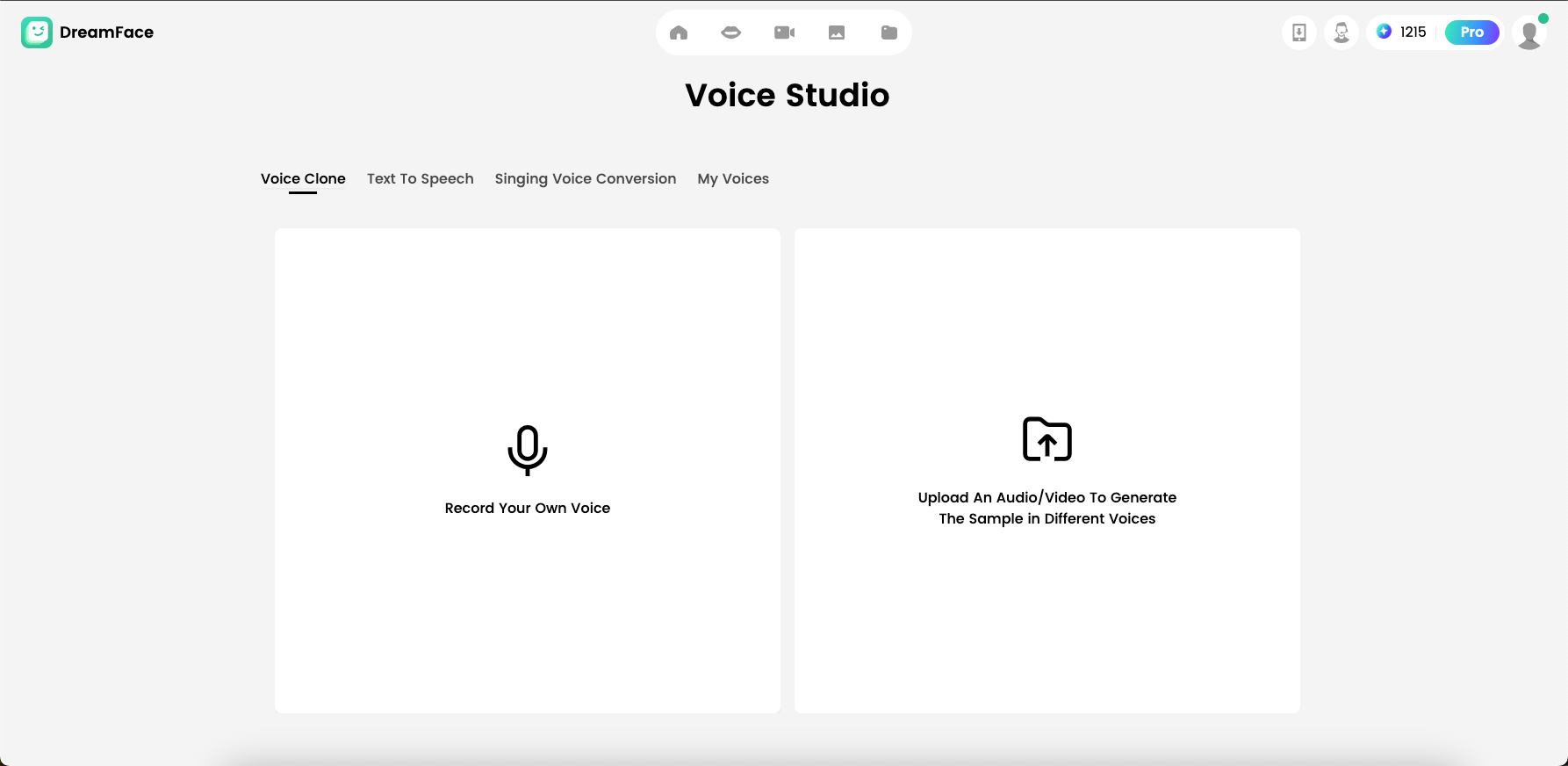
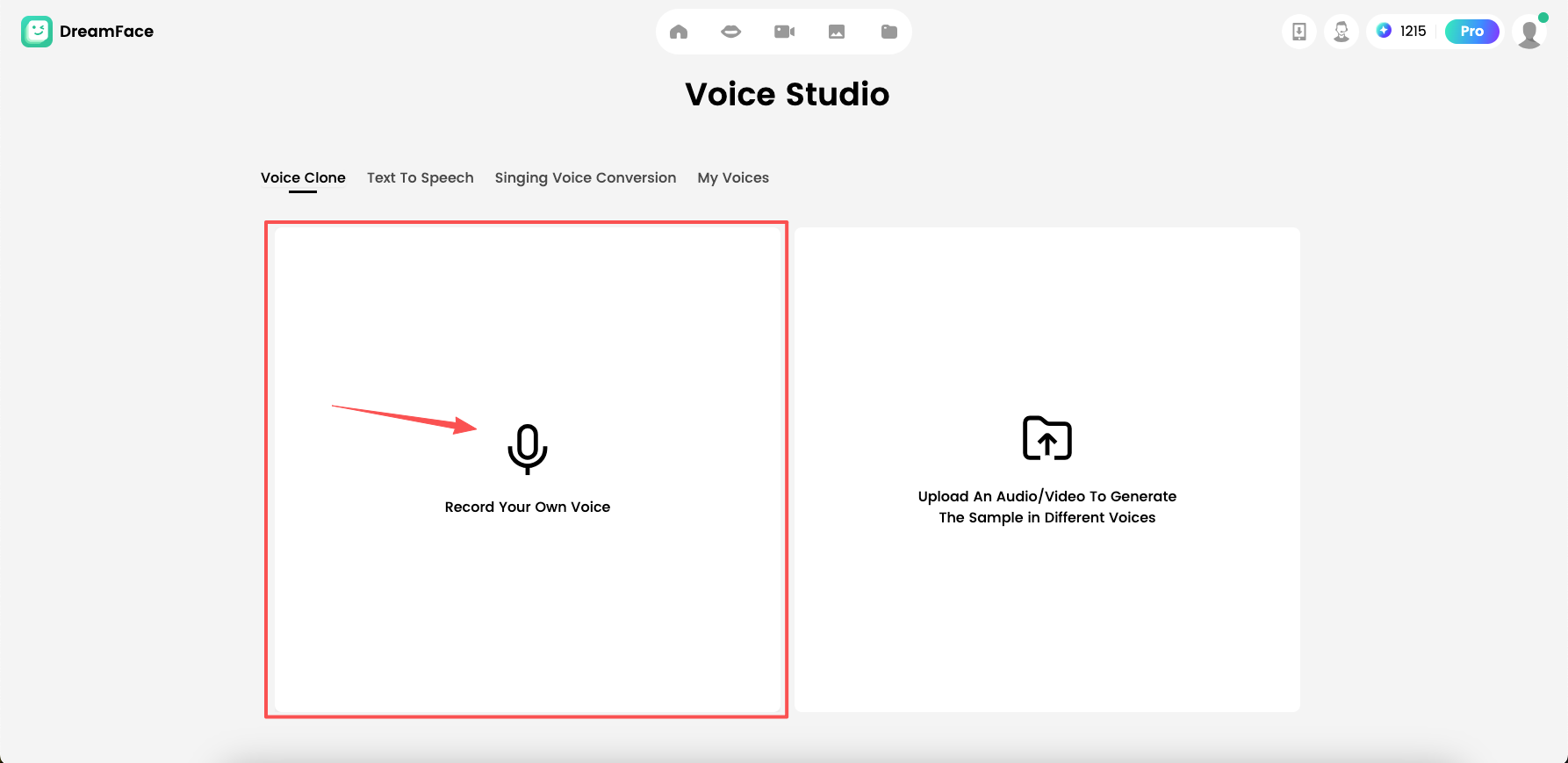
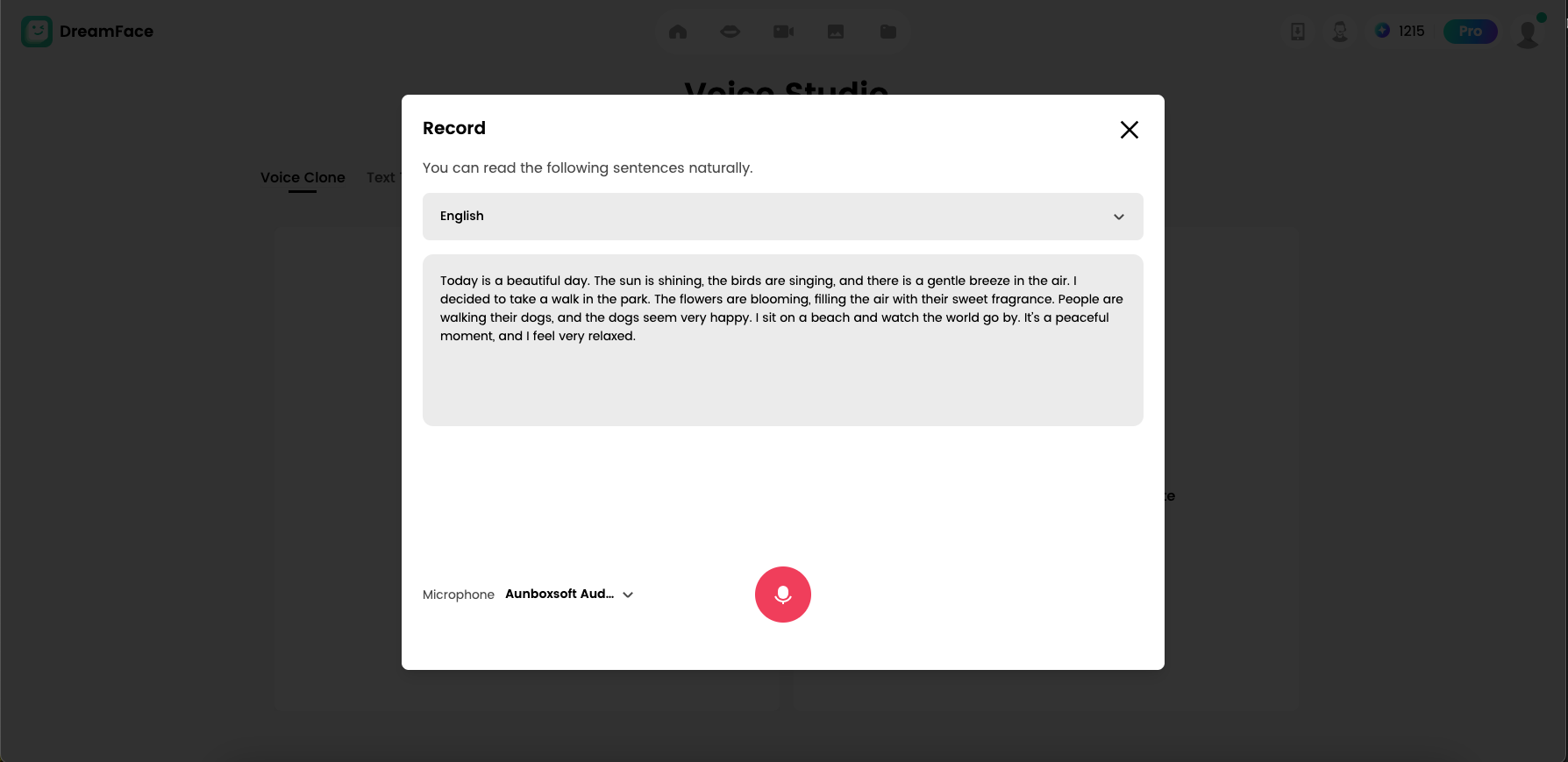
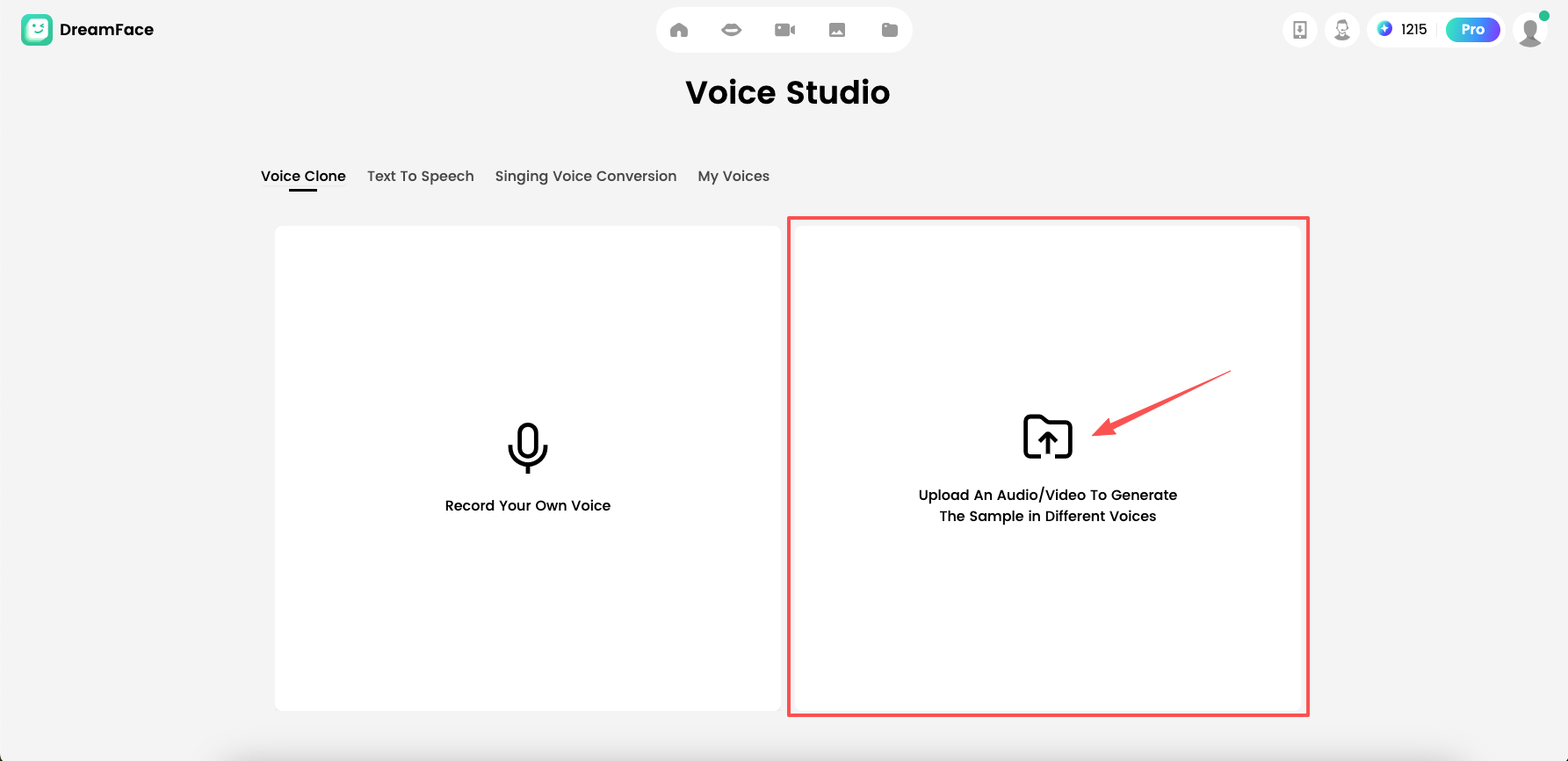
Option A: Record Your Voice Directly
If you want speed and simplicity:
- Record your voice inside the tool
- Confirm and generate This is perfect for quick Shorts/Reels narration.
Option B: Import a Pre-Recorded Voice-Over
If you want higher quality:
- Record audio using your phone mic, a USB mic, or any recorder
- Import the audio file into DreamFace Voice Studio
- Preview timing and clarity
- Generate the final version
This is ideal for creators who want professional voice texture and consistent branding.
Best Practices for Better Results (Creator Tips)
1) Write a Tight Script
Short-form content works best with:
- One clear hook
- One idea
- One call-to-action
2) Match Your Voice to the Video Pace
Keep your voice-over aligned with:
- the video duration
- the character’s “speaking rhythm” If your clip is longer, generate multiple segments and combine them in an editor.
3) Make Your Content More “Original”
Even if visuals come from an AI generator, you can boost originality by adding:
- your own voice
- your own commentary
- a unique angle, story, or tutorial framing This is especially useful if you’re concerned about reused content.
Where This Works Best (YouTube, Shorts & Reels)
This workflow is made for social platforms where speed + originality matters:
- YouTube videos (voice improves authority)
- YouTube Shorts (fast production, higher engagement)
- Instagram Reels / TikTok (voice-over is a strong differentiator)
If you’re trying to monetize, voice is a practical upgrade: it makes the content feel more “human,” less generic, and more creator-led.
Quick FAQ
Do I need to use Grok?
No. Grok is just one example. DreamFace Voice Studio can be used anytime you want to replace a video’s AI voice with your own voice-over.
Is recording inside DreamFace enough?
Yes for most creators. If you want higher audio quality, record externally and import.
Will this guarantee monetization approval?
Nothing can guarantee approval, but adding your own real voice is a strong step toward more original, creator-driven content.
Start Here: DreamFace Voice Studio
If you want to make AI videos more personal, more original, and more monetization-friendly, use DreamFace Voice Studio to replace AI voice with your own:
.webp)
DreamFace AI Live Avatar: Always-On AI Character Livestreaming
Turn any character into an always-on live streaming host — from talk shows and quizzes to memorial tributes and late-night companionship — with no one required behind the camera.
By Daniel一Aug 18, 2026- AI Video
- AI Live Avatar

Best AI Video Generator 2026: Why Multi-Model AI Platforms Are Winning
AI video generation has entered a completely new era in 2026. What started as short experimental clips has rapidly evolved into cinematic storytelling, AI anime production, virtual influencers, talking avatars, and fully AI-generated social media content.
By Bentley一May 26, 2026- AI Video Generator
- AI Video
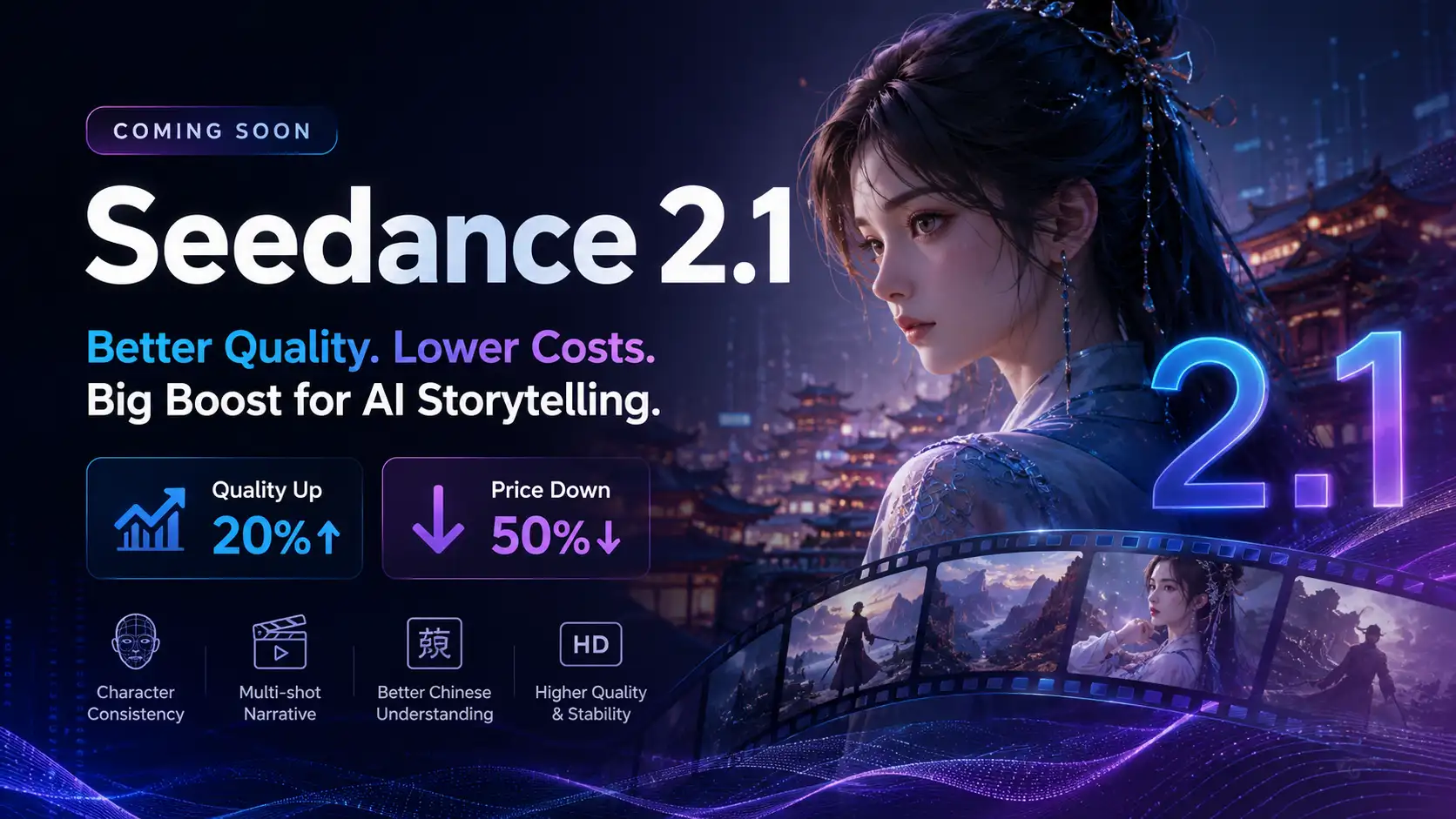
Seedance 2.1 Is Coming: Better Quality, Lower Costs, and a Big Boost for AI Storytelling
The AI video generation race has slowed down a bit recently. Earlier this year, new models were launching almost every week, pushing image and video generation forward at an incredible pace. After the buzz around GPT Image models, the industry has been waiting for the next major leap in AI video.
By stxph一May 23, 2026- AI Video
- Seedance 2.1
- Seedance 2.0