
'%3e%3cg%3e%3cpath%20d='M12.04834,6.05824C12.09325,4.8457799999999995,12.43703,3.78081,13.0715,2.89055C13.7092,1.995784,14.7633,1.3601670000000001,16.2063,1C16.215899999999998,1.0440338,16.2259,1.088092,16.2363,1.131979L16.2363,1.3623509999999999C16.2363,1.884725,16.1084,2.48372,15.856,3.14258C15.5915,3.78052,15.1781,4.38093,14.6291,4.92281C14.1157,5.40028,13.6406,5.71638,13.2207,5.85928C13.0822,5.9003,12.89209,5.94066,12.66255,5.97701C12.45842,6.00853,12.25362,6.03563,12.04834,6.05824ZM12.28933,7.85741C10.6594,7.85741,9.52778,6.42896,7.91997,6.42896C6.31224,6.42896,3,7.89332,3,12.9488C3,18.0043,5.94131,21.2617,6.27029,21.642C6.599209999999999,22.0224,7.36005,23,8.5387,23C9.71744,23,11.00787,22.0715,12.28933,22.0715C13.5707,22.0715,15.1836,23,16.2365,23C17.2895,23,17.7226,22.5747,18.4392,21.8411C19.1558,21.1074,20.5227,18.8686,21,17.5248C20.2137,17.061,18.1298,15.8019,18.1298,12.9488C18.1298,11.0468,18.831200000000003,9.4667,20.2341,8.20853C19.3138,7.02216,18.2464,6.42896,17.0318,6.42896C15.2099,6.42896,13.9193,7.85741,12.28933,7.85741Z'%20fill='%23000000'%20fill-opacity='1'/%3e%3c/g%3e%3c/g%3e%3c/svg%3e)
'%3e%3cg%3e%3cpath%20d='M6.2985500000000005,2L14.60082,10.81153L16.7432,8.537289999999999C13.81573,6.65184,9.89484,4.122529999999999,8.13152,2.985321L6.95017,2.225593C6.74135,2.090554,6.5177700000000005,2.0178354,6.2985500000000005,2ZM5.0312551,3.05499C5.0144537,3.1518100000000002,5,3.24911,5,3.35357L5,20.7675C5,20.8406,5.0138389,20.9085,5.0234395,20.9782L13.4695,12.0125L5.0312551,3.05499ZM18.1511,9.444659999999999L15.7321,12.0125L18.1089,14.5354C19.3682,13.7252,20.2405,13.1626,20.3372,13.1007C20.7653,12.8229,21.007,12.4039,20.9998,11.94614C20.9934,11.49683,20.7516,11.09514,20.340400000000002,10.84799C20.2484,10.79194,19.387999999999998,10.24048,18.1511,9.444659999999999ZM14.60082,13.2134L6.3235600000000005,22C6.48437,21.9703,6.64498,21.9194,6.79859,21.8209C7.01141,21.6833,12.76069,17.9805,16.701,15.4428L14.60082,13.2134Z'%20fill='%23000000'%20fill-opacity='1'/%3e%3c/g%3e%3c/g%3e%3c/svg%3e)

Best GPT Image 2 Prompt Examples: 8 Creative Ideas for Photos, Posters, UI, and Storytelling
Explore 8 GPT Image 2 prompt examples for photos, posters, UI mockups, characters, storytelling, and image editing, with tips to adapt each idea.
- Text-to-Image
- ChatGPT
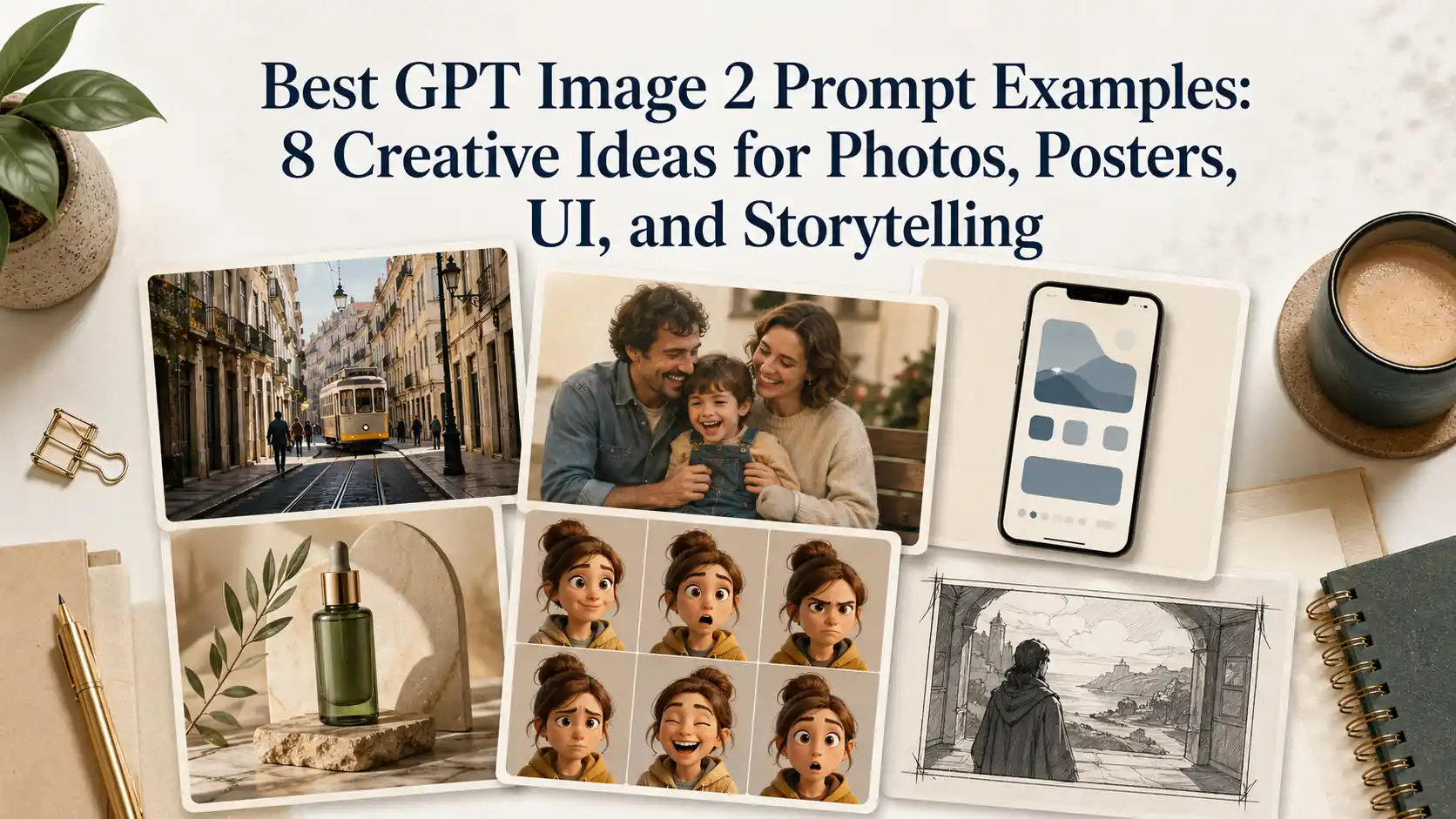
GPT Image 2 prompt examples are useful because they show how a simple idea can become a finished visual asset.
A strong prompt does more than ask for a beautiful image. It defines the format, subject, scene, layout, text, mood, and final use case. That is why the best prompts are not only good to copy. They are good to study.
In this guide, we will look at eight creative GPT Image 2 prompt ideas for realistic photos, nostalgic images, social media screenshots, UI mockups, commercial posters, character sheets, and photo editing.
Use them as starting points, not fixed templates. The real value is learning how each prompt is built.
What makes a GPT Image 2 prompt work?
The best GPT Image 2 prompts usually have five things in common.
First, they define the output format. A prompt for a phone screenshot, a poster, a storyboard, and a realistic photo should not be written the same way.
Second, they include specific visual details. Time of day, camera type, lighting, clothing, background objects, and small imperfections often matter more than broad style words.
Third, they control text and layout when needed. This is especially important for posters, UI screenshots, infographics, and social media-style images.
Fourth, they describe the final use case. A prompt for a profile photo should be different from a prompt for an e-commerce banner or a story concept.
Fifth, they avoid being too generic. Words like “cinematic,” “beautiful,” and “high quality” can help, but they are not enough on their own.
1. Realistic night photo prompt: convenience store scene
This type of prompt is useful for realistic lifestyle photos, urban storytelling, social media visuals, and short-form video concepts.
The idea is simple: create an ordinary city moment that feels like it was captured by a real photographer. The scene does not need to be dramatic. In fact, the realism comes from small everyday details.
Prompt to use
Create an ultra-realistic urban street group photo at a convenience store entrance at 10 PM summer night.3-4 young people briefly chatting at the entrance, someone holding drinks, someone sitting on plastic outdoor chairs, someone standing looking at their phone. Bright white light streaming through the glass doors and windows, warm yellow street lights and distant car headlights outside. Characters wearing everyday clothes: T-shirts, shirts, shorts, jeans, sneakers. No internet celebrity styling. Faces and postures must look like real pedestrians, not overly polished.Environment must include real convenience store elements: freezer stickers, promotional posters, trash cans, entrance mats, glass reflections, shared bikes on roadside, water droplets from drink bottles on ground. The image should look like a very authentic life slice captured by a photographer in the city. Focus on testing natural multi-person interactions, night convenience store lighting, glass reflections, and ordinary people's vibe restoration.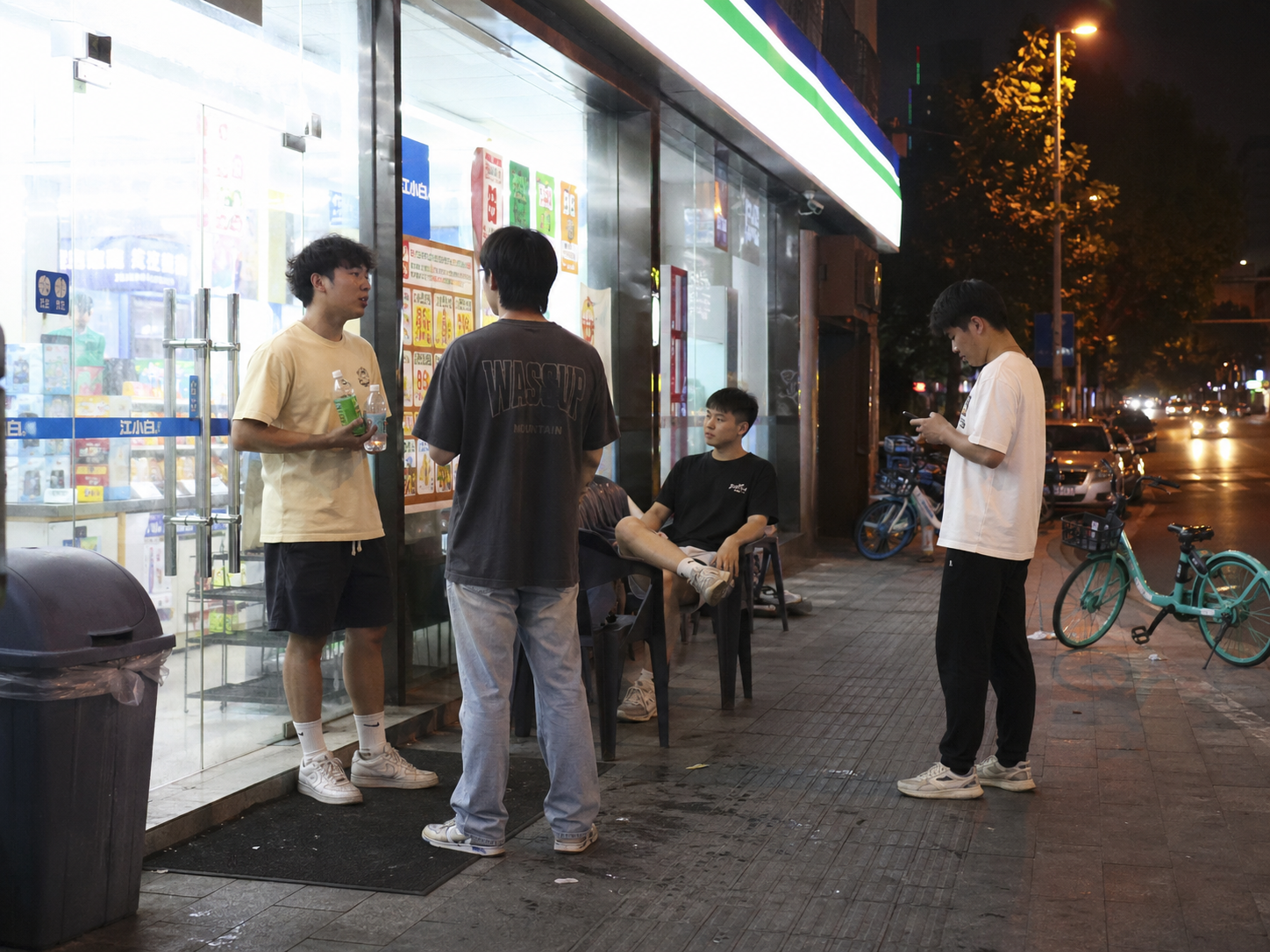
Why this prompt works
This prompt works because it avoids the polished AI look.
It does not ask for models, perfect faces, luxury styling, or dramatic lighting. Instead, it builds realism through ordinary clothes, shared bikes, trash cans, plastic chairs, store lights, glass reflections, and people doing small natural actions.
The phrase “No internet celebrity styling” is especially useful. It tells the model not to make the people look too staged or influencer-like.
How to adapt it
You can reuse this structure for many realistic photo scenes.
Try replacing the location and details:
Create an ultra-realistic street photo outside a small ramen shop on a rainy winter night. A few office workers are waiting near the entrance, one person is checking a phone, another is holding an umbrella, and warm light spills out from the shop window. Include wet pavement, reflections, bicycles, menu posters, steam near the doorway, and ordinary clothing. The image should feel like a real candid photo, not a polished fashion shoot.Image suggestion
Generate one image using the convenience store prompt and place it after this section. This image should show readers how small real-world details make a GPT Image 2 photo feel more believable.
2. RAW iPhone photo prompt: subway station
This type of prompt is useful when you want a photo that feels casual, imperfect, and real.
Many AI image prompts try too hard. They ask for sharp details, perfect lighting, and cinematic quality. But real phone photos often have blur, awkward framing, mixed lighting, and ordinary people in the background.
Prompt to use
Create a completely RAW quality, unprocessed, unedited image with full iPhone camera quality. A subway station in USA, a momentary blur.The subway is in motion. In front of the subway, there is an elderly woman and man.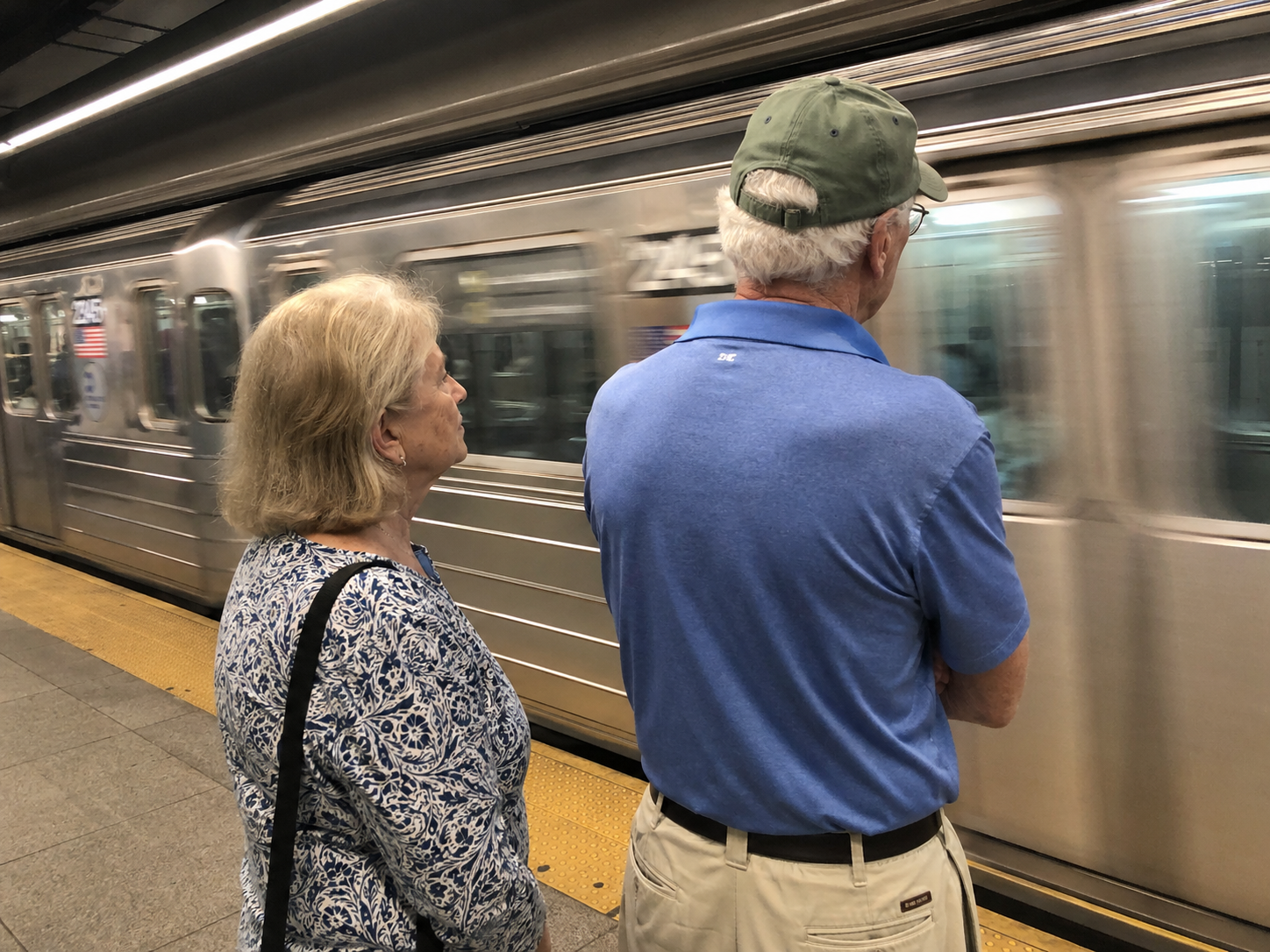
Why this prompt works
This prompt is short, but it gives the model a clear direction.
The important words are “RAW,” “unprocessed,” “unedited,” “iPhone camera quality,” and “momentary blur.” These tell the model to avoid the polished stock-photo look.
The subject is also simple. A moving subway and two elderly people in front of it create a real public-space moment. There is no need for a complicated story.
How to adapt it
Use this format when you want a realistic phone-photo look:
Create a completely RAW, unedited iPhone-style photo of [subject] in [location]. Include [natural imperfection], [lighting condition], and [ordinary background detail]. The image should feel casual and unprocessed, not staged.For example:
Create a completely RAW, unedited iPhone-style photo of a student waiting at a bus stop on a cloudy morning. Include slight motion blur, uneven street lighting, a wet sidewalk, and ordinary background traffic. The image should feel casual and unprocessed, not staged.Image suggestion
Generate one image using the subway station prompt and place it here. It will help show that a short prompt can still create a strong result when the visual direction is clear.
3. Nostalgic family photo prompt: 2003 digital camera snapshot
This prompt idea is useful for memory-style photos, family-themed content, holiday greetings, and emotional visual storytelling.
A nostalgic image does not need a huge amount of detail. It needs the right time period, camera style, relationship, and place.
Prompt to use
Generate a photo from 2003, shot with a digital camera, of five-year-old me with my mom and dad in the courtyard of our residential compound in China.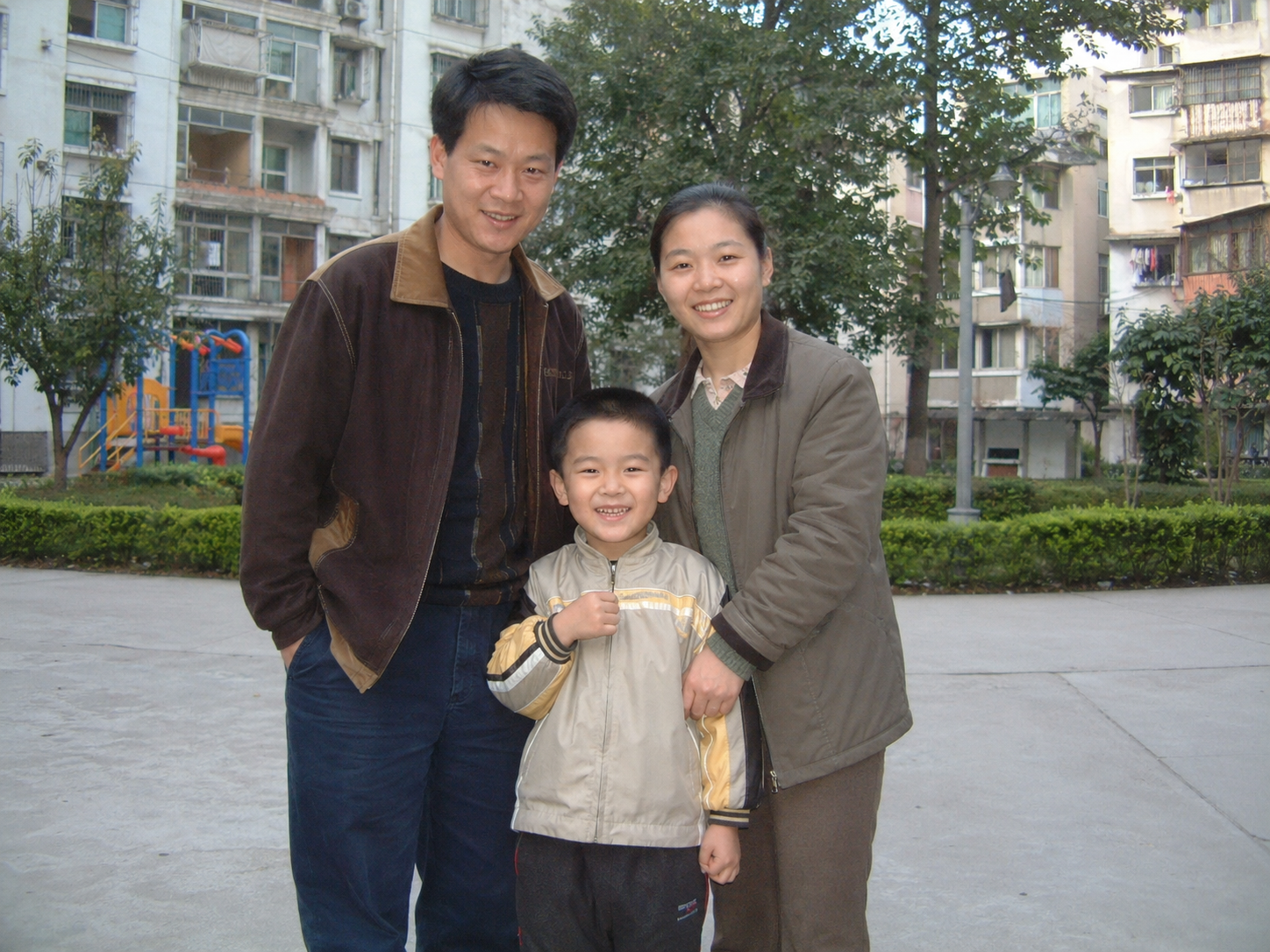
Why this prompt works
This prompt works because it gives the image a memory structure.
It includes:
- a clear year
- a camera type
- a family relationship
- an age
- a specific location
Those details are enough to create a believable family-photo feeling.
The phrase “shot with a digital camera” is important. It tells the model not to create a modern smartphone photo or a polished studio portrait. It should feel like an old personal snapshot.
How to adapt it
You can adapt this prompt for many personal memory scenes:
Generate a photo from 2006, shot with a compact digital camera, of a child celebrating a birthday with grandparents in a small apartment living room. The image should feel like an old family snapshot, with simple indoor lighting, casual clothes, and a warm personal memory atmosphere.You can also adapt it for seasonal or gift-related content:
Generate a nostalgic family photo from the early 2000s, shot with a digital camera, of a mother and child standing in a neighborhood garden on a sunny afternoon. The image should feel warm, personal, and imperfect, like a real family memory.Creator workflow idea
This kind of image can work as more than a still picture.
For example, a nostalgic family-style image can become the starting point for a greeting card, a short memory video, or a talking photo. If you are creating emotional content for Mother’s Day, birthdays, anniversaries, or family messages, this prompt structure is especially useful.
Image suggestion
Generate one image using the 2003 family snapshot prompt and place it here. This visual should support the idea that a simple memory-based prompt can create a strong emotional image.
4. Social media storytelling prompt: YouTube time travel screenshot
This prompt idea is useful for viral concepts, meme-style visuals, short video thumbnails, and social media storytelling.
Instead of asking for a normal historical image, the prompt puts a historical scene inside a modern platform format. That contrast makes the idea more shareable.
Prompt to use
Screenshot of a YouTube video showing someone who time-traveled to the Middle Ages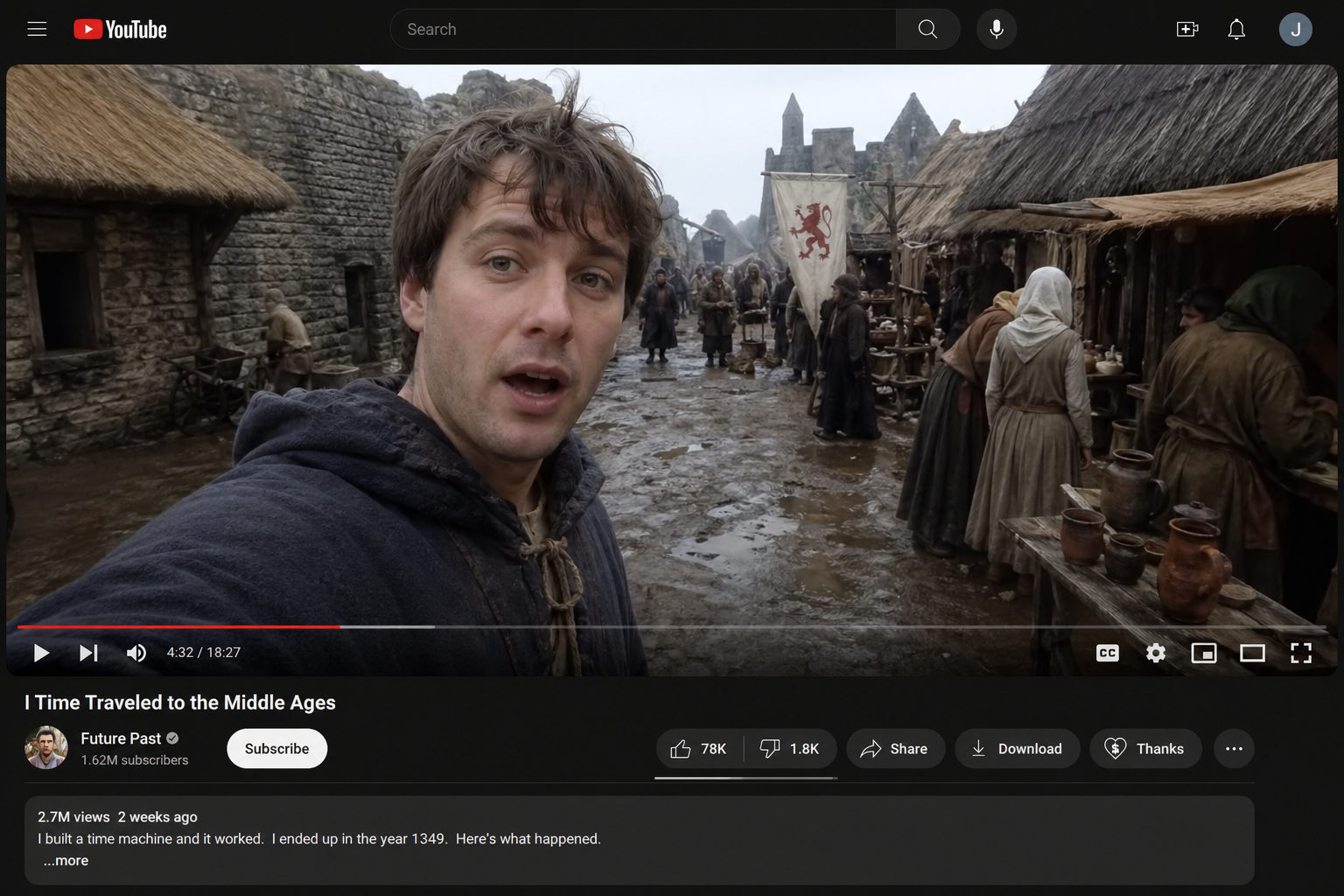
Why this prompt works
This prompt is effective because it combines two ideas that do not normally belong together.
One side is modern: a YouTube video screenshot.
The other side is historical: someone time-traveling to the Middle Ages.
That contrast gives the image a built-in story. The viewer immediately understands that something strange, funny, or dramatic is happening.
How to adapt it
The easiest way to adapt this prompt is to keep the platform format and change the story.
Examples:
Screenshot of a TikTok livestream showing someone accidentally time-traveled to ancient RomeScreenshot of an Instagram story showing a tourist filming dinosaurs from a city busScreenshot of a YouTube video showing a medieval knight reviewing modern fast foodYou can make this type of prompt stronger by adding platform details:
Create a realistic YouTube video screenshot showing someone who time-traveled to the Middle Ages. Include a video title, progress bar, comment preview, suggested videos on the side, and a dramatic paused frame where modern clothing clashes with the medieval setting.Why creators should study this example
This prompt teaches an important lesson: a GPT Image 2 prompt does not always need to start with visual style.
Sometimes the strongest prompt starts with a content format.
A fake YouTube screenshot, livestream frame, social media post, product page, or app notification can give the image a clear context before the visual details are even added.
Image suggestion
Generate one image using the YouTube time travel prompt and place it here. This image should show how a platform screenshot can turn a simple idea into a story.
5. UI prompt example: e-commerce app homepage
This prompt idea is useful for UI mockups, product concept visuals, app landing pages, and design inspiration.
A good UI prompt should not only describe the style. It should describe the interface structure.
Prompt to use
Generate a high-fidelity mobile e-commerce app homepage screenshot inspired by mainstream Chinese e-commerce apps in 2026.The interface should look fully realistic, with complete mobile-app UI logic and strong commercial design polish.Layout requirements: - status bar with time 9:41, 5G signal, and battery icon - search area with a city selector on the left, a rounded search box in the center, and message plus scan icons on the right - horizontal category tabs below the search area - top promotional carousel banner - 10-icon function grid - flash-sale module with countdown and three product cards - "guess you like" two-column product waterfall with at least 6 product cards - bottom tab bar with five tabs Use these exact Chinese labels where appropriate: - city: "杭州" - search placeholder: "搜索耳机、咖啡机、运动鞋" - category tabs: "推荐、数码、家电、服饰、美妆、食品、运动、家居" - top banner: "618 预售开启" and "每满300减50" - function grid: "超市、百亿补贴、秒杀、直播、充值中心、到家、领券、品牌馆、全球购、排行榜" - flash sale title: "限时秒杀" - recommendation section: "猜你喜欢" - bottom tabs: "首页、分类、购物车、消息、我的" All Chinese text must be clear and readable with realistic fonts.Spacing, icon style, white space, shadows, rounded corners, dividers, and tag treatments should closely resemble a real app screenshot rather than concept art.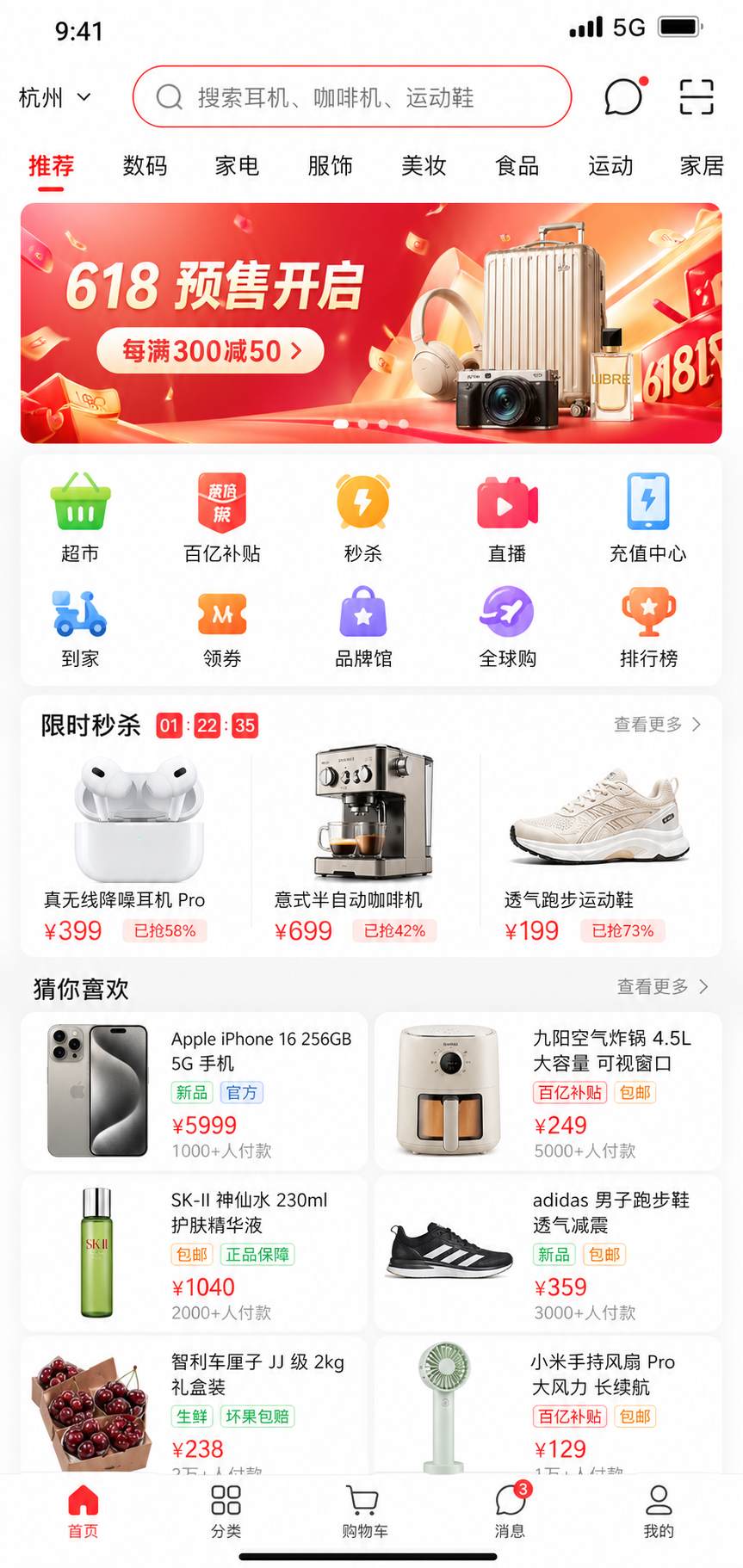
Why this prompt works
This is a strong UI prompt because it gives the model information architecture.
It does not simply say “make an e-commerce app.” It defines the whole screen:
- status bar
- search area
- category tabs
- promotional banner
- function grid
- flash sale module
- product waterfall
- bottom navigation
It also provides exact Chinese labels. That matters because UI images often fail when the text is vague. If you want a realistic app screenshot, the model needs to know what the interface should say.
How to adapt it
Use this structure for other app types:
Generate a high-fidelity mobile [app type] homepage screenshot for [target audience/use case].The interface should look realistic, with complete mobile-app UI logic and polished commercial design.Layout requirements:- [top status bar]- [main navigation]- [search or input area]- [main content module]- [secondary content module]- [cards, buttons, or product elements]- [bottom tab bar]Use these exact labels where appropriate:- [label 1]- [label 2]- [label 3]All text must be clear and readable. The final result should look like a real app screenshot rather than concept art.For example, you could adapt it into a fitness app, travel app, language-learning app, music app, food delivery app, or AI photo editing app.
What this teaches about GPT Image 2 prompting
For UI, the best prompt pattern is not style-first. It is structure-first.
Start with what the screen is, who it is for, and what modules must appear. Then add visual style, text labels, spacing, shadows, and polish.
Image suggestion
Generate one image using the e-commerce app homepage prompt and place it here. This image should show readers how detailed layout requirements improve UI mockup results.
6. Poster prompt example: Chinese tea drink launch poster
This prompt idea is useful for product launch posters, food and beverage campaigns, local business promotions, and social media ads.
Poster prompts need more than a pretty visual style. They need hierarchy. The model must know what the main title is, what the product is, what the offer is, and which details should be smaller.
Prompt to use
Design a 3:4 vertical poster for a new Chinese trendy tea launch. Use a New Chinese visual style that feels light-luxury and restrained. The palette should be dark green, off-white, and gold, with rice-paper texture, elegant negative space, landscape accents, and modern layout design.Main subject: a visually appealing cold-brew tea with tea leaves, citrus, ice cubes, and touches of gold foil.The poster must accurately display the following exact Chinese copy: "山川茶事" "山柚观音" "冷泡系列" "新品上市" "一口清醒,半城入夏" "限定尝鲜价" "中杯 16 元" "大杯 19 元" "门店活动" "第二杯半价" "加 3 元升级轻乳版" "每日前 100 名赠限定杯套" "推荐风味" "观音茶底 / 西柚果香 / 轻乳云顶 / 冰感回甘" "活动时间 4月20日 至 5月10日" "扫码点单" "SHANCHUAN TEA" Fine print: "图片仅供参考,请以门店实际售卖为准" Maintain a clear promotional hierarchy while keeping the overall feeling sophisticated rather than cheap or overly e-commerce-like.Pay special attention to small text, numbers, prices, info modules, and Chinese typography aesthetics.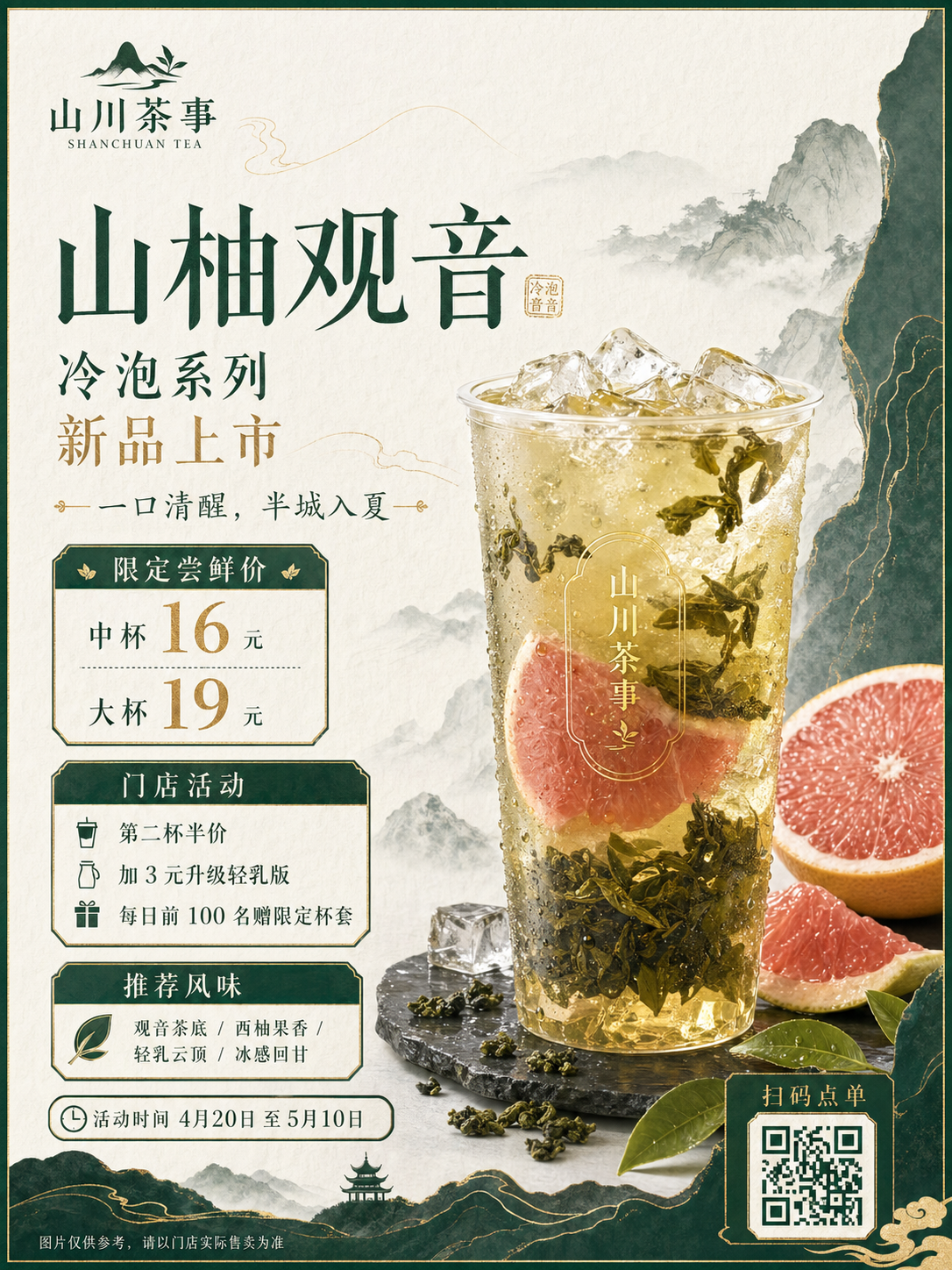
Why this prompt works
This is a strong poster prompt because it controls both visual style and commercial information.
It gives the model:
- aspect ratio
- product category
- visual style
- color palette
- material texture
- main subject
- exact Chinese copy
- pricing
- activity details
- brand text
- fine print
- hierarchy requirements
The phrase “sophisticated rather than cheap or overly e-commerce-like” is also useful. It sets a design boundary. Without that boundary, the model might create a loud discount poster instead of a premium tea launch poster.
How to adapt it
Use this pattern for other commercial posters:
Design a [ratio] vertical poster for a new [product category] launch. Use a [visual style] that feels [brand tone]. The palette should be [colors], with [textures or visual motifs].Main subject: [product visual].The poster must accurately display the following exact copy: [headline], [product name], [campaign line], [price], [promotion], [event time], [call to action], [brand name], and [fine print].Maintain a clear promotional hierarchy while keeping the overall feeling [desired brand feeling]. Pay special attention to small text, numbers, prices, info modules, and typography aesthetics.You can adapt this into:
- coffee shop seasonal drink poster
- skincare product launch poster
- bakery new product poster
- gym membership campaign poster
- Mother’s Day gift poster
- AI avatar app promotion poster
What this teaches about poster prompting
For posters, the key is not only image quality. It is information control.
If the poster needs text, prices, dates, or product modules, write them clearly in the prompt. Do not expect the model to guess your campaign structure.
Image suggestion
Generate one image using the Chinese tea drink poster prompt and place it here. This image should show how GPT Image 2 handles commercial hierarchy, Chinese copy, and product-poster styling.
7. Character consistency prompt: 16-panel anime expression grid
This prompt idea is useful for character design, avatar development, comic planning, sticker packs, and short-form storytelling.
A single good character image is helpful. But a consistent character sheet is more useful if you want to build a repeatable visual identity.
Prompt to use
Create a 16-panel expression grid of a silver-haired, blue-eyed anime girl. Her face shape, hairstyle, and clothing must remain highly consistent across all panels.The 16 expressions should include: happy, sad, angry, surprised, shy, speechless, evil grin, contemplative, curious, proud, wronged, disdainful, confused, scared, crying, and a heart expression.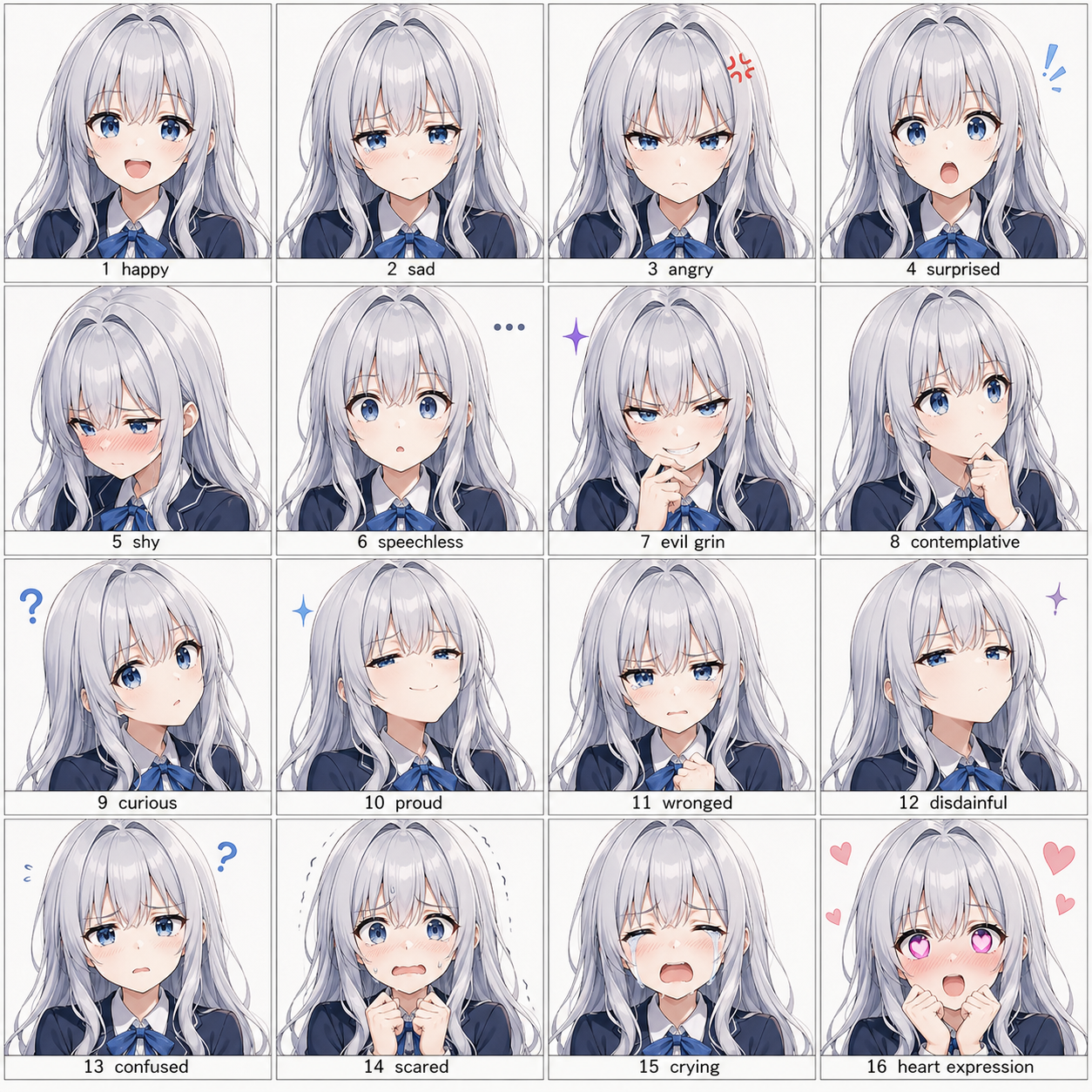
Why this prompt works
This prompt works because it directly asks for consistency.
It does not only describe the character. It tells the model what must remain stable across the grid:
- face shape
- hairstyle
- clothing
Then it lists the expressions one by one. That gives each panel a purpose.
This is much stronger than asking for “many expressions” in a vague way.
How to adapt it
You can use this structure for many character systems:
Create a 16-panel expression grid of a [character description]. The character’s face shape, hairstyle, outfit, color palette, and key accessories must remain highly consistent across all panels.The 16 expressions should include: happy, sad, angry, surprised, shy, confused, proud, worried, excited, embarrassed, focused, laughing, crying, sleepy, serious, and a heart expression.For a brand mascot:
Create a 16-panel expression grid of a friendly robot mascot for an AI photo app. The robot’s face shape, screen eyes, rounded body, blue-white color palette, and small camera icon must remain highly consistent across all panels.The 16 expressions should include: happy, surprised, confused, proud, shy, thinking, excited, worried, laughing, focused, sleepy, celebrating, apologetic, curious, crying, and heart eyes.Creator workflow idea
This kind of grid can help before animation.
If you want to turn a character into an avatar, sticker pack, comic, or talking video asset, a consistency grid gives you a stronger reference point. It defines what should stay the same and what can change.
Image suggestion
Generate one image using the 16-panel expression grid prompt and place it here. This image should show how expression variation and character consistency can work together.
8. Image editing prompt: pro Instagram photo enhancement
This prompt idea is useful for improving existing photos instead of generating new ones from scratch.
It works for social media portraits, profile images, creator photos, lifestyle content, and before-after edits.
Prompt to use
Enhance this iPhone photo with ChatGPT so it looks like a professional photographer and designer worked on it.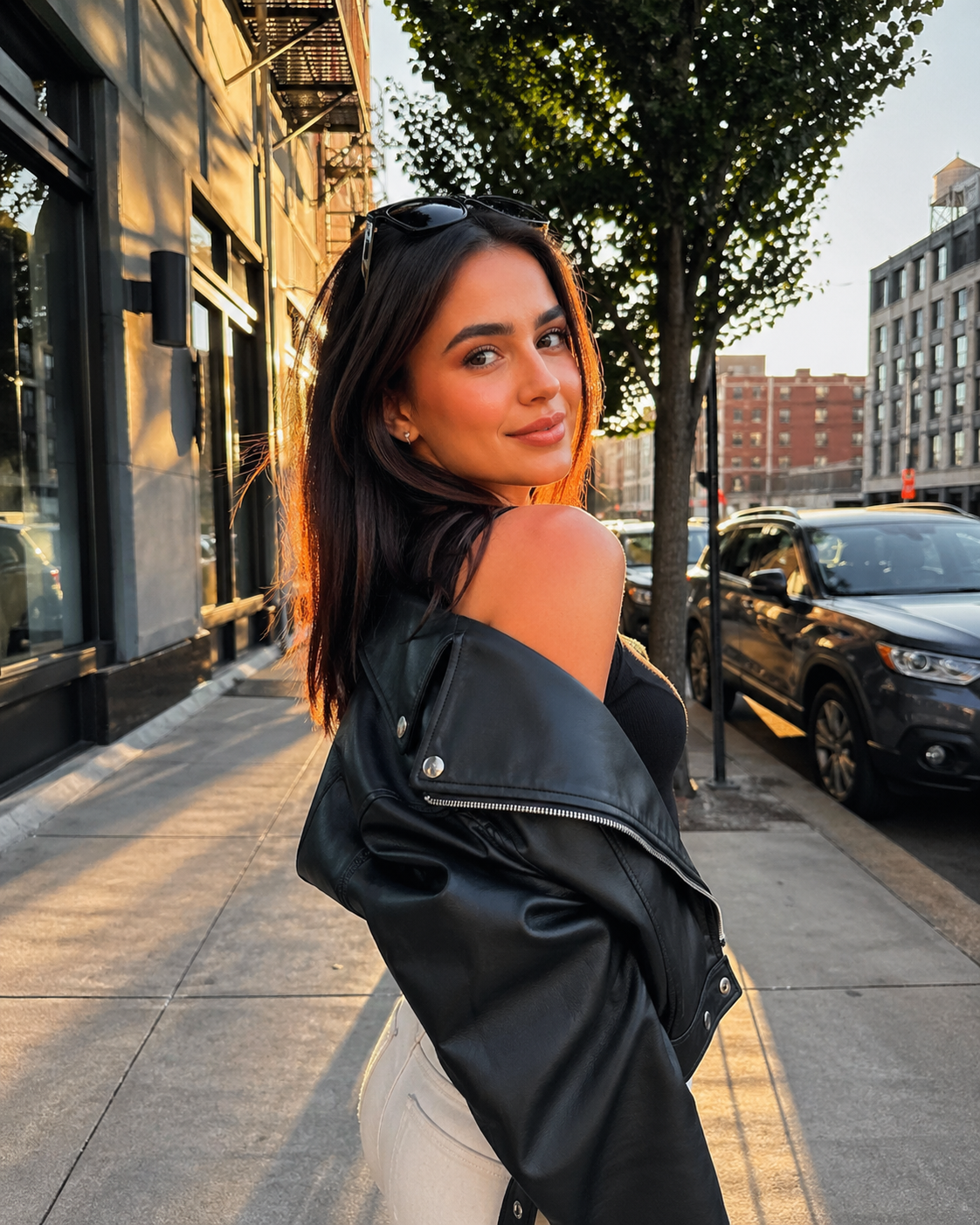
Why this prompt works
This prompt is short, but it gives the model a clear editing goal.
It does not ask the model to change the subject. It asks the model to improve the image so it looks professionally handled.
For real use, you may want to add more constraints. This is especially important if the original photo includes a person, a product, or a recognizable location.
How to adapt it
A stronger version would be:
Enhance this iPhone photo so it looks like a professional photographer and designer worked on it. Keep the subject’s identity, pose, clothing, and facial features natural. Improve lighting, contrast, color balance, background cleanliness, and overall composition. Do not make the image look over-edited, artificial, or like a studio-generated portrait.For a profile photo:
Enhance this iPhone portrait so it looks suitable for a clean social media profile photo. Keep the person’s identity, face, hairstyle, and clothing natural. Improve lighting, skin tone, background clarity, and composition while preserving a realistic phone-photo feeling.For a product image:
Enhance this iPhone product photo so it looks suitable for an online store or social media campaign. Keep the product shape, color, label, and main details accurate. Improve lighting, shadows, background cleanliness, and visual focus without changing the product identity.What this teaches about image editing prompts
When editing an existing image, the prompt should say what to improve and what to preserve.
That is the main difference between image generation and image editing. In generation, you define what to create. In editing, you must also protect what should not change.
Image suggestion
Use your own before photo, apply the enhancement prompt, and place the before-after result here. This image should show how a short editing prompt can improve a real photo while keeping the original subject recognizable.
Which GPT Image 2 prompt example should you start with?
The best prompt to start with depends on what you want to create.
| Goal | Best example to start with | Why it helps |
|---|---|---|
| Realistic lifestyle photo | Convenience store night scene | Strong scene detail and natural human interaction |
| Casual phone-photo realism | RAW iPhone subway station | Short prompt with clear camera and motion cues |
| Emotional family content | 2003 digital camera snapshot | Strong memory structure with simple details |
| Viral social media idea | YouTube time travel screenshot | Clear platform format and story contrast |
| App interface mockup | E-commerce app homepage | Detailed layout and UI text control |
| Commercial poster | Chinese tea drink launch poster | Strong hierarchy, product focus, and exact copy |
| Character design | 16-panel anime expression grid | Consistency across expressions |
| Photo editing | Pro Instagram photo enhancement | Clear improvement goal for existing images |
If you are new to GPT Image 2 prompts, start with photo prompts first. They are easier to understand and easier to adjust.
If you need business visuals, try the poster and UI prompts. They require more detail, but they teach you how to control layout and text.
If you are building a recurring character, use the expression grid prompt. It helps you move beyond one-off images.
How to write your own GPT Image 2 prompts from these examples
The easiest way to write better GPT Image 2 prompts is to start with the output format.
Do not begin with “make something beautiful.” Begin with the object you actually need.
Use this simple structure:
Create a [format] of [subject] for [use case].The scene should include [main subject], [environment], [lighting], [style], and [important details].If text appears in the image, use the exact text: [copy].The final image should feel like [quality target], not [thing to avoid].For example:
Create a vertical product launch poster for a new AI photo app feature.The scene should include a smartphone showing a before-after portrait enhancement, soft studio lighting, clean white and blue gradients, rounded UI cards, and a polished app-store marketing feel.Use the exact text: "Turn everyday photos into studio-ready portraits" and "Try AI Photo Enhance."The final image should feel premium and clear, not crowded or overly futuristic.This structure works because it gives the model a job, not just a mood.
From GPT Image 2 prompts to creator workflows
GPT Image 2 is useful for generating still visuals, but many creator workflows do not stop at the image.
A realistic photo can become a story post.
A nostalgic family image can become a greeting video.
A character sheet can become the starting point for an avatar.
A poster can become part of a campaign.
A UI mockup can become a product concept page.
A photo enhancement prompt can become part of a before-after content format.
This is where image generation starts to connect with video, social media, and avatar tools. For example, a still image can later be used as the base for a talking photo, animated avatar, or short video asset.
The best workflow is not only “generate an image.” It is:
idea → prompt → image → edit → animate or publishThat is why studying prompt examples matters. You are not just learning how to write better prompts. You are learning how to design better visual content.
Common mistakes to avoid
Do not rely only on style words
Words like “cinematic,” “beautiful,” “premium,” and “realistic” are useful, but they are not enough.
Add concrete details.
Instead of:
Create a realistic night photo.Write:
Create a realistic night street photo outside a small convenience store, with warm indoor light, wet pavement, glass reflections, shared bikes, and two people holding drinks near the entrance.Do not forget the output format
A poster, screenshot, photo, UI mockup, and character grid need different prompt structures.
Always tell the model what kind of image it is making.
Do not leave text vague
If your image includes text, write the exact copy.
This is especially important for posters, menus, app screens, social media posts, and infographics.
Do not over-polish realistic scenes
For realistic photos, small flaws often make the result better.
Motion blur, fingerprints, reflections, uneven lighting, casual clothing, and imperfect framing can make the image feel more believable.
Do not ignore what should stay consistent
For character design and image editing, tell the model what should not change.
That can include face shape, outfit, product label, color palette, pose, background, or identity.
FAQ
What are the best GPT Image 2 prompts for beginners?
The best GPT Image 2 prompts for beginners are realistic photo prompts, nostalgic snapshot prompts, and simple social media screenshot prompts. They are easier to understand because they have clear subjects, scenes, and formats.
Are long GPT Image 2 prompts always better?
Long GPT Image 2 prompts are not always better. Short prompts can work well when the visual goal is clear, such as a RAW iPhone-style photo. Longer prompts are more useful for posters, UI screens, infographics, and multi-panel character grids.
What makes a GPT Image 2 prompt effective?
An effective GPT Image 2 prompt defines the output format, subject, scene, visual details, text requirements, and final use case. The more specific the task, the easier it is for the model to follow your intent.
Can GPT Image 2 prompts be used for UI design?
Yes, GPT Image 2 prompts can be used for UI mockups if the prompt describes the interface structure clearly. Include the app type, screen purpose, navigation, modules, buttons, labels, and visual style.
Can GPT Image 2 prompts help with video content?
Yes, GPT Image 2 prompts can help with video content by creating still assets first. You can use them to generate storyboards, character references, thumbnails, social media screenshots, posters, or images that later become animated clips.
How should I adapt someone else’s GPT Image 2 prompt?
Adapt the structure, not just the words. Keep the useful pattern, such as format plus scene plus details, then change the subject, setting, text, style, and use case for your own project.
Final takeaways
The best GPT Image 2 prompt examples are not valuable because they are perfect one-click formulas.
They are valuable because they show reusable creative patterns.
A realistic photo prompt teaches scene detail.
A nostalgic snapshot prompt teaches emotional context.
A social screenshot prompt teaches storytelling format.
A UI prompt teaches layout control.
A poster prompt teaches text hierarchy.
A character grid prompt teaches consistency.
An image editing prompt teaches preservation and improvement.
Once you understand those patterns, you can stop copying prompts word for word and start building your own visual workflow.
GPT Image 2.5 Prompting Guide: 4 Real Examples for Creators
A campaign image can look beautiful and still miss the brief. The headline might compete with a face, a product diagram might become unreadable on mobile, or an outfit edit might change more than the clothes.
By Skylar一Sep 18, 2026- Text-to-Image
- AI Image Generator
- GPT Image 2.5
Google Nano Banana 2 Review: Pro-Grade Image Generation at Flash-Level Pricing
When Google’s CEO Sundar Pichai publicly called Nano Banana 2 “our best image model yet,” it wasn’t just marketing bravado. With immediate deployment across Gemini App, Google Search (in 141 countries), Flow, and preview access via Google AI Studio and Vertex AI, Google made it clear: this isn’t an experimental release.
By Harrison一Feb 26, 2026- Text-to-Image
- AI Image Generator
- Nano Banana 2
How to Create Winter Olympics–Style Images with AI
AI text-to-image and image-to-image tools allow creators to generate Winter Olympics–style visuals using prompts or reference photos. By describing winter sports scenes or transforming existing images, users can create cinematic snow, ice, and athlete-themed visuals inspired by the 2026 Winter Olympics. These AI image workflows are widely used for posters, social media graphics, and creative sports content without professional design skills.
By Pianeer一Feb 05, 2026- AI Image Generator
- Text-to-Image
- AI Photo