
'%3e%3cg%3e%3cpath%20d='M12.04834,6.05824C12.09325,4.8457799999999995,12.43703,3.78081,13.0715,2.89055C13.7092,1.995784,14.7633,1.3601670000000001,16.2063,1C16.215899999999998,1.0440338,16.2259,1.088092,16.2363,1.131979L16.2363,1.3623509999999999C16.2363,1.884725,16.1084,2.48372,15.856,3.14258C15.5915,3.78052,15.1781,4.38093,14.6291,4.92281C14.1157,5.40028,13.6406,5.71638,13.2207,5.85928C13.0822,5.9003,12.89209,5.94066,12.66255,5.97701C12.45842,6.00853,12.25362,6.03563,12.04834,6.05824ZM12.28933,7.85741C10.6594,7.85741,9.52778,6.42896,7.91997,6.42896C6.31224,6.42896,3,7.89332,3,12.9488C3,18.0043,5.94131,21.2617,6.27029,21.642C6.599209999999999,22.0224,7.36005,23,8.5387,23C9.71744,23,11.00787,22.0715,12.28933,22.0715C13.5707,22.0715,15.1836,23,16.2365,23C17.2895,23,17.7226,22.5747,18.4392,21.8411C19.1558,21.1074,20.5227,18.8686,21,17.5248C20.2137,17.061,18.1298,15.8019,18.1298,12.9488C18.1298,11.0468,18.831200000000003,9.4667,20.2341,8.20853C19.3138,7.02216,18.2464,6.42896,17.0318,6.42896C15.2099,6.42896,13.9193,7.85741,12.28933,7.85741Z'%20fill='%23000000'%20fill-opacity='1'/%3e%3c/g%3e%3c/g%3e%3c/svg%3e)
'%3e%3cg%3e%3cpath%20d='M6.2985500000000005,2L14.60082,10.81153L16.7432,8.537289999999999C13.81573,6.65184,9.89484,4.122529999999999,8.13152,2.985321L6.95017,2.225593C6.74135,2.090554,6.5177700000000005,2.0178354,6.2985500000000005,2ZM5.0312551,3.05499C5.0144537,3.1518100000000002,5,3.24911,5,3.35357L5,20.7675C5,20.8406,5.0138389,20.9085,5.0234395,20.9782L13.4695,12.0125L5.0312551,3.05499ZM18.1511,9.444659999999999L15.7321,12.0125L18.1089,14.5354C19.3682,13.7252,20.2405,13.1626,20.3372,13.1007C20.7653,12.8229,21.007,12.4039,20.9998,11.94614C20.9934,11.49683,20.7516,11.09514,20.340400000000002,10.84799C20.2484,10.79194,19.387999999999998,10.24048,18.1511,9.444659999999999ZM14.60082,13.2134L6.3235600000000005,22C6.48437,21.9703,6.64498,21.9194,6.79859,21.8209C7.01141,21.6833,12.76069,17.9805,16.701,15.4428L14.60082,13.2134Z'%20fill='%23000000'%20fill-opacity='1'/%3e%3c/g%3e%3c/g%3e%3c/svg%3e)

How to Create a 1.9M-viewed Viral “AI Fruit Eating Itself” Video with Veo 3 on DreamFace 🍓🍑🍉
Want to learn how to make your own AI fruit eating itself video with DreamFace? Follow these five easy steps
- AI Video
- AI Video Generator
- Veo 3
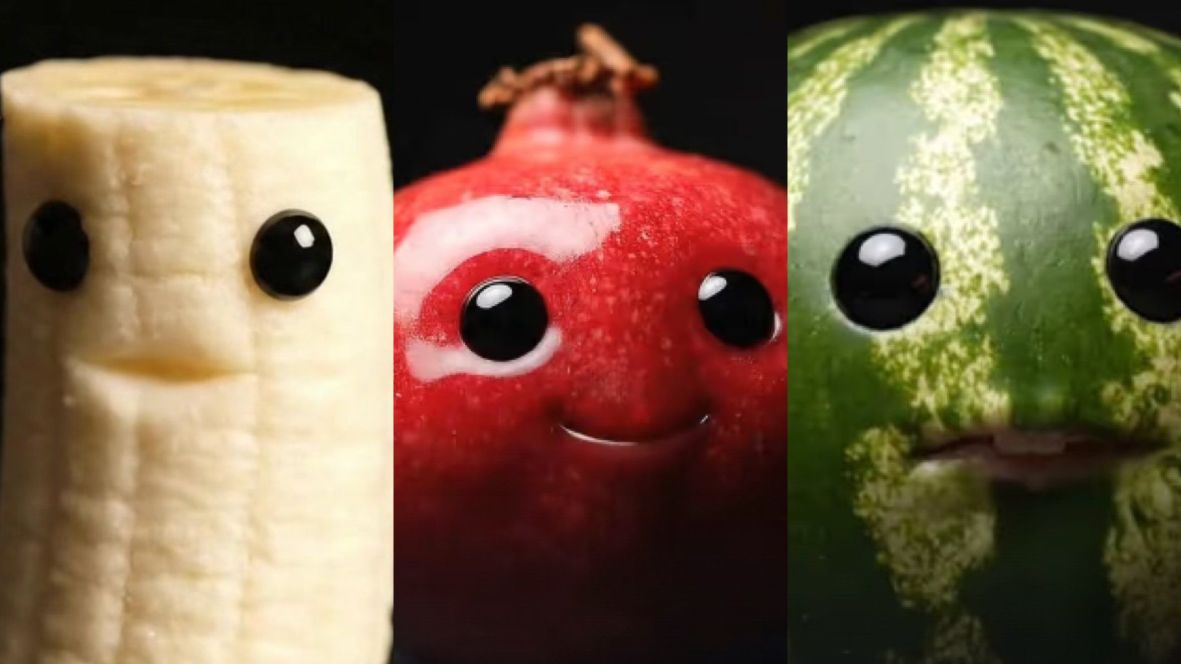
What if your favorite fruits had faces, eyes, and mouths—and started eating themselves? Sounds crazy, right? But that’s exactly the latest viral trend: AI fruit eating fruit videos! Imagine a smiling peach munching on a slice of peach, or a cheeky watermelon nibbling on its own juicy flesh. It’s weird, hilarious, and oddly satisfying—and it’s blowing up across social media.
One such video has already racked up 1.9 millions of views, proving just how much audiences love this surreal, funny, and creative content. Want to learn how to make your own AI fruit eating itself video with DreamFace? Follow these five easy steps:
Step 1: Choose AI Image in DreamFace
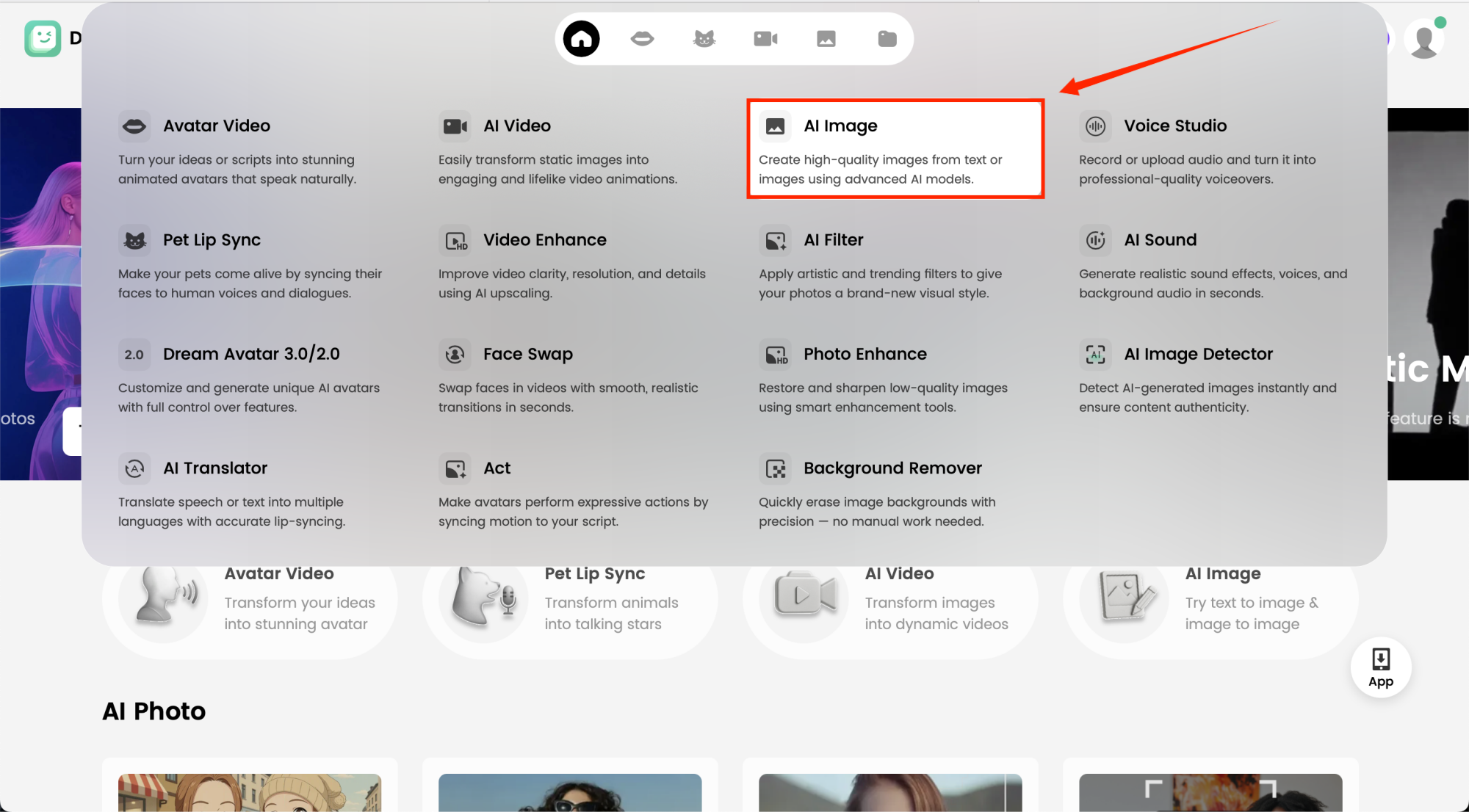
Click AI Image in DreamFace to kick off your project. This will generate the base fruit image you’ll animate later—no prompts needed yet, just the starting point.
Step 2: Choose Your AI Model & Customize Your Fruit
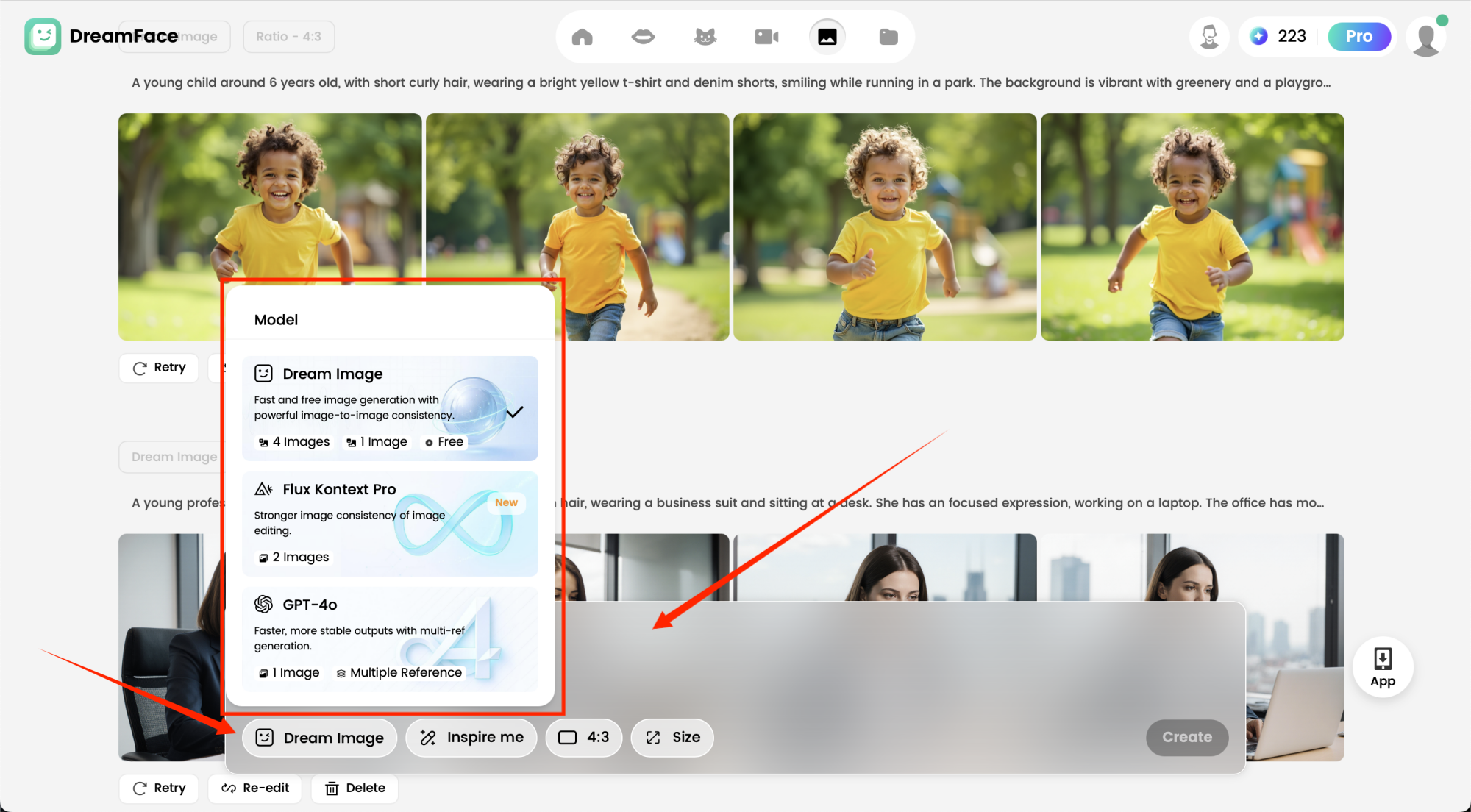
Once you’ve got your base fruit image, it’s time to make it come alive! Choose the AI model that fits your style—realistic, cartoonish, or anything in between. Then, customize your fruit character by inputting detailed prompts for the facial features and expressions, for example “A smiling banana with big eyes and a human-like mouth” You can do the same for other fruits like peaches, apples, or watermelons for even more variety.
Step 3: Choose AI Video in DreamFace
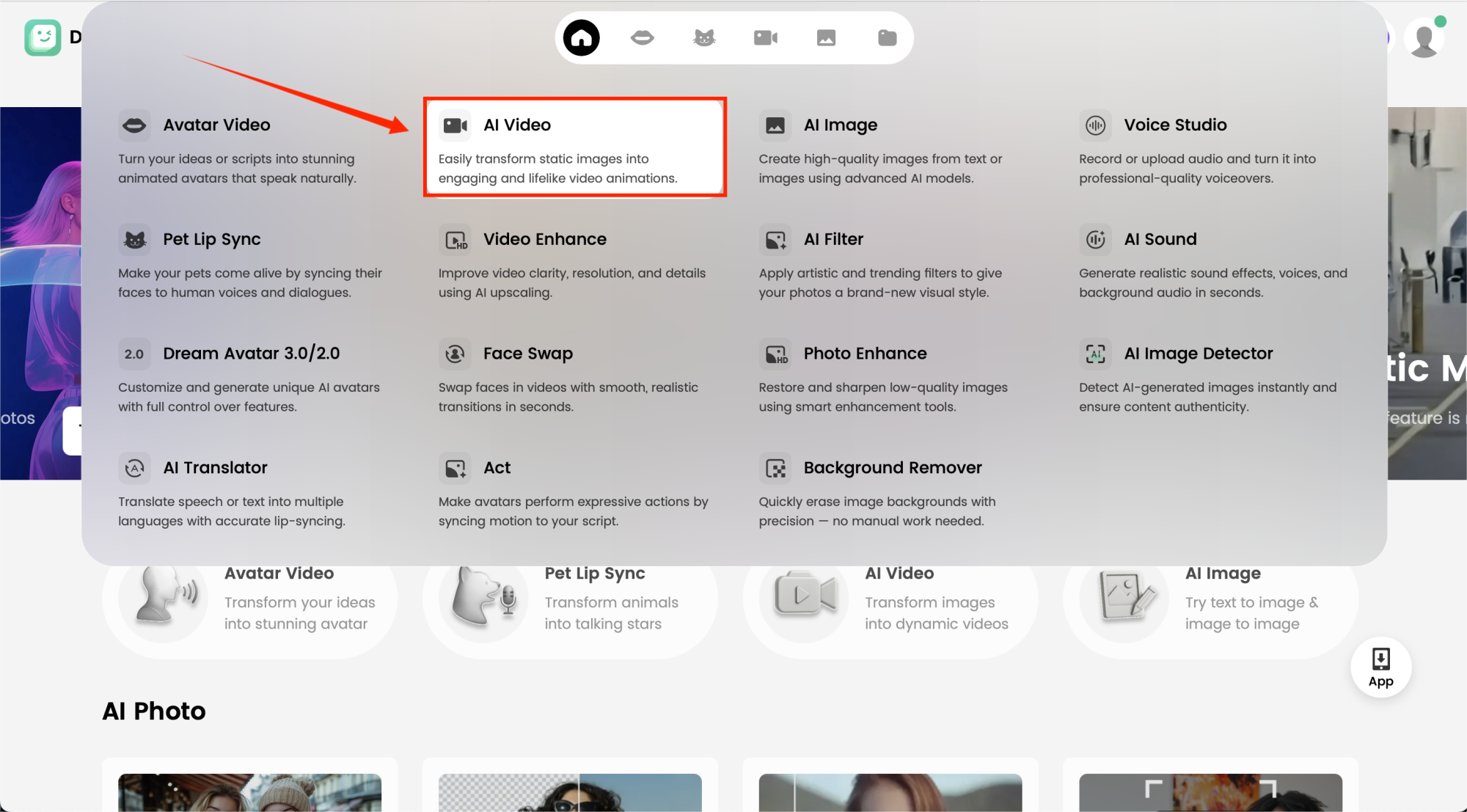
Switch to AI Video in DreamFace. This feature animates your fruit, letting it blink, smile, and move naturally, transforming your static image into a lively character.
Step 4: Activate the Google VEO3 Fast Function & Input Prompts
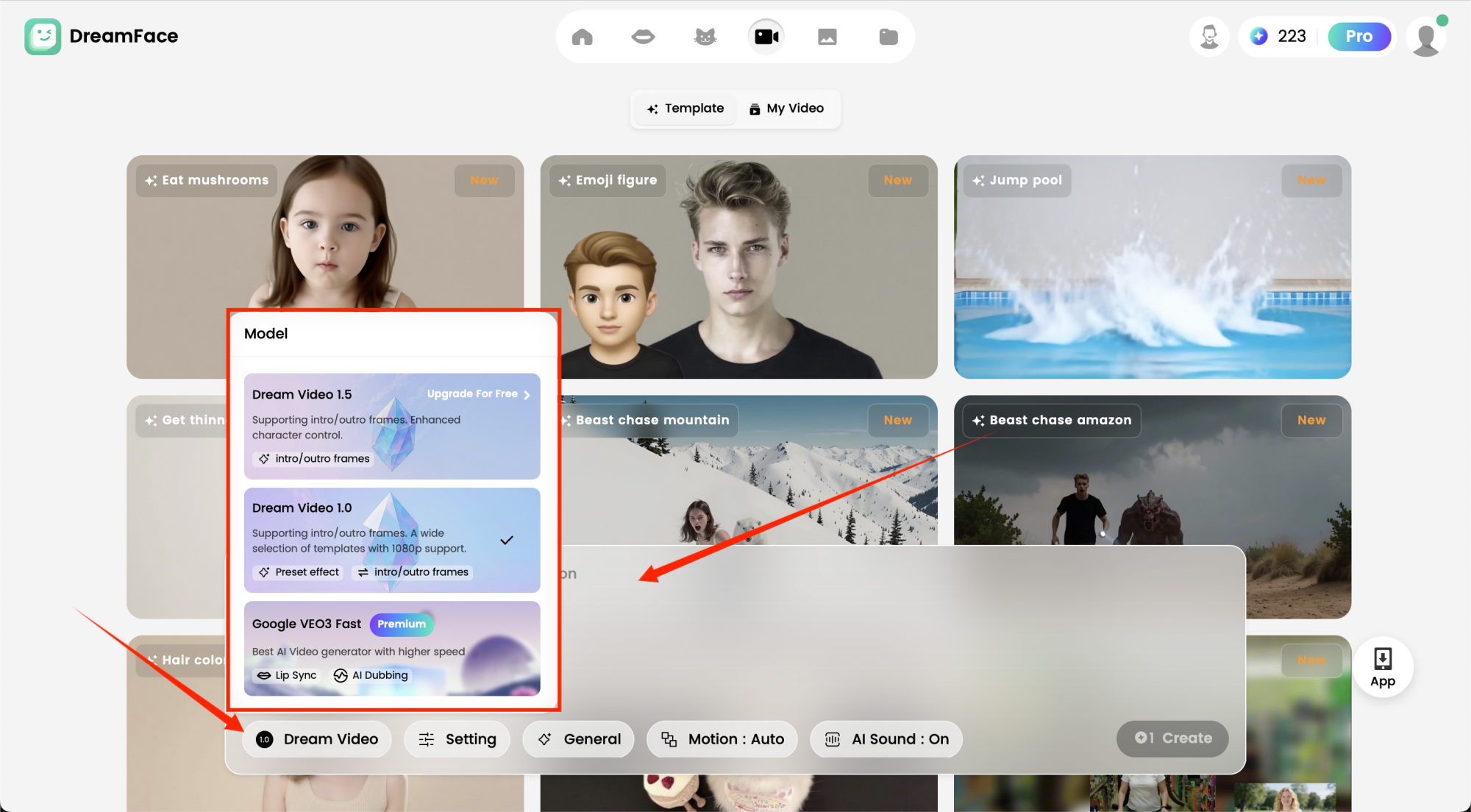
Activate the Google VEO3 Fast Function to enhance the speed and quality of your animation. Once activated, input specific prompts to guide the animation. This will ensure your fruits move and interact with their surroundings just like a real human would.
Example Prompt: “A cheerful banana with a playful human face, big expressive eyes, and a wide smiling mouth. The banana is holding a peeled piece of itself and taking a bite, looking cheeky and mischievous. The background is a bright kitchen with sunlight streaming in, giving it a fun and lively vibe. 🍌”
Step 5: Generate & Watch the Fruits Come to Life
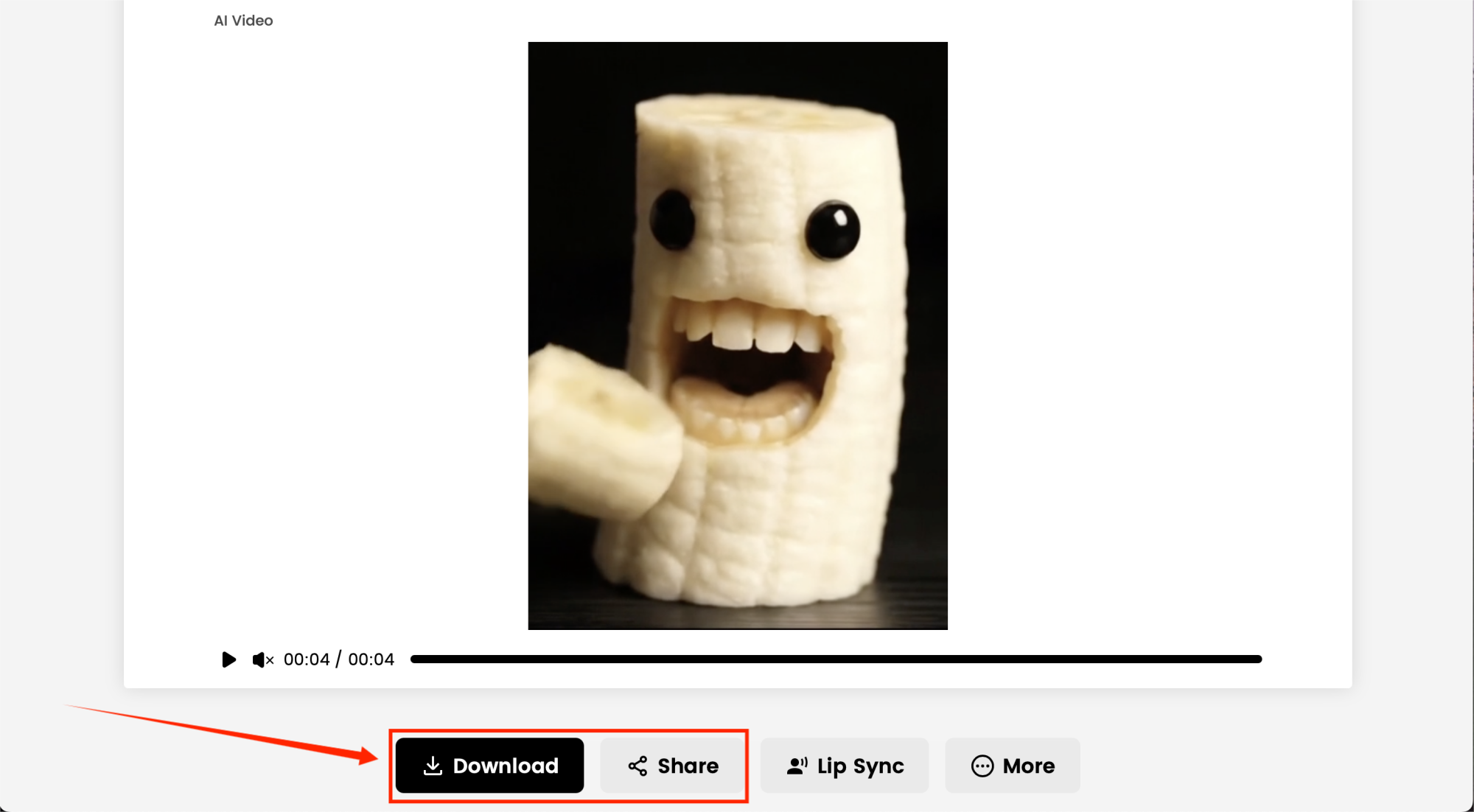
Click Generate and watch the magic happen! Your peach, watermelon, or banana will come alive—eyes sparkling, mouth chomping, creating the ultimate AI fruit eating fruit moment. Once finished, preview, download, and share it on TikTok, Instagram, or YouTube to join the viral wave.
Final Thoughts
With DreamFace and Veo 3, making a hilarious AI fruit eating itself video has never been easier. This quirky, surreal content is exactly what audiences love—and what’s fueling millions of views online.
So why not give it a try? Create your own AI fruit eating fruit masterpiece today—you might just be the next viral sensation! 🍑🍉🍌
.webp)
DreamFace AI Live Avatar: Always-On AI Character Livestreaming
Turn any character into an always-on live streaming host — from talk shows and quizzes to memorial tributes and late-night companionship — with no one required behind the camera.
By Daniel一Aug 18, 2026- AI Video
- AI Live Avatar

Best AI Video Generator 2026: Why Multi-Model AI Platforms Are Winning
AI video generation has entered a completely new era in 2026. What started as short experimental clips has rapidly evolved into cinematic storytelling, AI anime production, virtual influencers, talking avatars, and fully AI-generated social media content.
By Bentley一May 26, 2026- AI Video Generator
- AI Video

Seedance 2.1 Is Coming: Better Quality, Lower Costs, and a Big Boost for AI Storytelling
The AI video generation race has slowed down a bit recently. Earlier this year, new models were launching almost every week, pushing image and video generation forward at an incredible pace. After the buzz around GPT Image models, the industry has been waiting for the next major leap in AI video.
By stxph一May 23, 2026- AI Video
- Seedance 2.1
- Seedance 2.0