


Why Is This Guy Grating Cheese at Super Bowl Game?
An AI talking avatar is a digital character that can speak, lip-sync, and explain information using text or audio input. Creators use AI talking avatars to add context to viral moments, sports clips, and internet memes by turning confusing visuals into short, clear explainer videos. In 2026, AI talking avatars are widely used for social media commentary, sports rivalries, and fast-moving online trends because they require no filming or editing skills.
- Image-to-Video
- Avatar Video
- AI Video
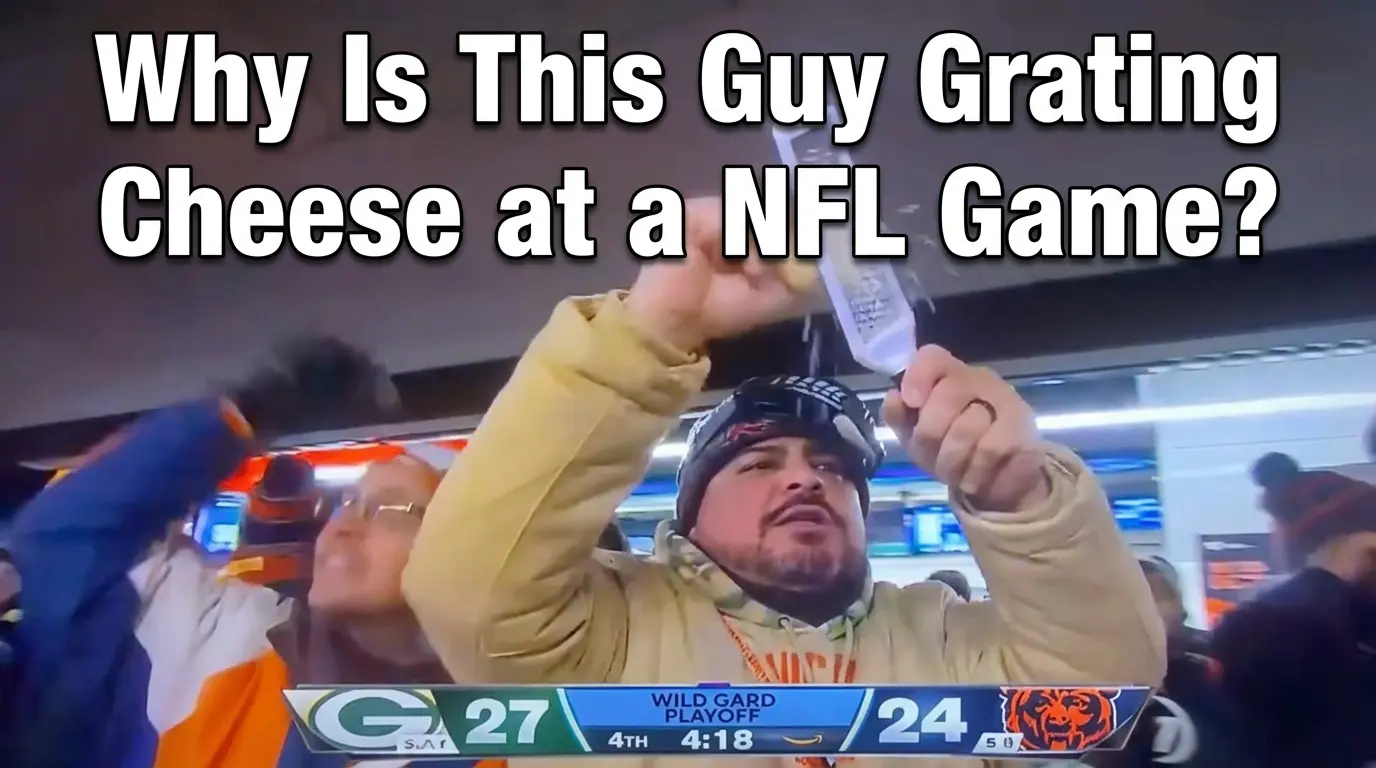
If you were watching the Chicago Bears vs. Green Bay Packers playoff game and suddenly saw a fan pull out a literal cheese grater and start aggressively shredding cheese over the railing — no, you didn’t hallucinate.
A Chicago Bears fan actually brought a cheese grater into the stands and used it mid-game as the Bears rallied from a halftime deficit to defeat their long-time rivals 31–27. The broadcast caught the moment perfectly: cheese flying, emotions high, Packers fans on the receiving end.
If this made zero sense to you, you’re not alone.
This Looked Unhinged — Until You Know the Context
Without context, the moment is pure chaos:
- A grown man
- At a playoff game
- Grating cheese like it’s a cooking show
But with context, it becomes peak sports rivalry.
Green Bay Packers fans are famously nicknamed “cheeseheads”, a label rooted in Wisconsin culture that has evolved into one of the most recognizable identities in American sports. Foam cheese hats are a common sight at Packers games and have become a long-running part of NFL meme culture.
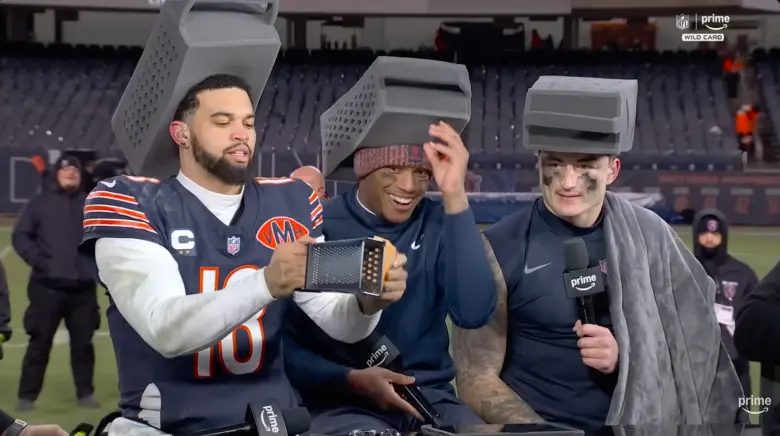
In recent seasons, Chicago Bears players — including DJ Moore — have leaned into this rivalry by wearing foam cheese grater hats as a visual taunt. The fan in the stands simply took that joke one step further. Instead of symbolism, he made it literal — turning a cultural insult into a physical, unmistakable visual gag.
That escalation is exactly why the moment landed so hard online. It wasn’t random chaos. It was rivalry humor pushed just far enough to become unforgettable.
It also happened to coincide with the Bears’ first playoff victory over Green Bay in nearly 15 years, turning a strange action into the defining image of the night.
Why Moments Like This Go Viral
Viral moments don’t spread just because they’re impressive.
They spread because they’re confusing.
People don’t ask:
“Wow, was that technically skilled?”
They ask:
“Why did this happen?”
That question — “What am I looking at?” — is exactly why explainers outperform highlights across social media.
And this is where AI talking avatars quietly become useful.
What Is an AI Talking Avatar?
An AI talking avatar is a digital character that can speak, lip-sync, and express facial movement based on text or audio input.
Instead of filming a person on camera, creators use AI avatars to:
- Explain complex or niche topics
- Add context to viral moments
- Create short, clear explainer videos
- Communicate across different languages
When a visual moment spreads faster than its explanation, a talking avatar becomes the fastest way to close that gap.
Why AI Talking Avatars Work So Well for Viral Sports Moments
Sports memes travel globally. Context often doesn’t.
A Bears vs. Packers rivalry joke might make sense to lifelong NFL fans, but not to:
- Casual viewers
- International audiences
- People seeing the clip for the first time on TikTok or Instagram
AI talking avatars are commonly used to:
- Explain rivalries in under 60 seconds
- Add neutral, clear commentary
- Turn chaotic clips into understandable stories
- Deliver the same explanation consistently
Instead of reacting louder, they explain better.
How to Create an AI Talking Avatar (Step by Step)
Step 1: Choose an Image or Avatar
Start with a clear photo or avatar image. Front-facing images with good lighting produce the most natural facial animation.
Step 2: Write a Short Script
Keep it simple and conversational. For example:
“This Bears fan wasn’t just cooking. He was trolling the Packers’ cheesehead legacy after a playoff comeback.”
Short scripts work best for viral explainers.
Step 3: Select Voice and Language
Modern AI avatar tools allow you to choose:
- Different voice styles
- Emotional tones
- Multiple languages
This makes it easy to adapt one explanation for global audiences.
Step 4: Generate Lip-Sync and Facial Animation
The system automatically syncs mouth movement and facial expressions to the script or audio. No editing or animation skills are required.
Step 5: Export and Share
Once generated, export the video and post it alongside the viral clip on social platforms, blogs, or news feeds.
Where Tools Like DreamFace Fit In
Platforms like DreamFace are designed for exactly this type of use case.
They allow creators to quickly turn confusing or context-heavy moments into short explainer videos using AI talking avatars — without filming, editing timelines, or technical setup.
This makes them especially useful for:
- Sports commentary
- Viral meme explanations
- Short-form social content
- Multilingual audiences
Why This Trend Keeps Growing
The internet produces more moments than explanations.
As clips move faster than context, creators increasingly rely on AI talking avatars to:
- Slow things down
- Explain clearly
- Add meaning without noise
Sometimes the internet doesn’t need another reaction video.
It just needs someone — or something — to explain why a man brought a cheese grater to a football game.
Frequently Asked Questions
- Why do people use AI talking avatars for viral content?
They provide fast, clear explanations without requiring on-camera filming or editing.
- Can AI talking avatars be used for sports content?
Yes. They’re commonly used for game summaries, rivalries, rule explanations, and viral moments.
- Do I need technical skills to create an AI talking avatar?
No. Most platforms are designed for non-technical users.
- Can AI talking avatars speak multiple languages?
Yes. Many tools support multilingual voice generation, making them suitable for global audiences.
Final Thought
Viral moments don’t go viral because they’re logical.
They go viral because they’re confusing.
Learning how to create an AI talking avatar gives creators a way to turn chaos into context — whether it’s a sports rivalry, a meme, or a man grating cheese in the middle of a playoff game.
.webp)
DreamFace AI Live Avatar: Always-On AI Character Livestreaming
Turn any character into an always-on live streaming host — from talk shows and quizzes to memorial tributes and late-night companionship — with no one required behind the camera.
By Daniel一Aug 18, 2026- AI Video
- AI Live Avatar

Best AI Video Generator 2026: Why Multi-Model AI Platforms Are Winning
AI video generation has entered a completely new era in 2026. What started as short experimental clips has rapidly evolved into cinematic storytelling, AI anime production, virtual influencers, talking avatars, and fully AI-generated social media content.
By Bentley一May 26, 2026- AI Video Generator
- AI Video
Seedance 2.1 Is Coming: Better Quality, Lower Costs, and a Big Boost for AI Storytelling
The AI video generation race has slowed down a bit recently. Earlier this year, new models were launching almost every week, pushing image and video generation forward at an incredible pace. After the buzz around GPT Image models, the industry has been waiting for the next major leap in AI video.
By stxph一May 23, 2026- AI Video
- Seedance 2.1
- Seedance 2.0